Lesson 7: Migrations
Schema change as versioned code
Your documents table needs a new column. The tempting approach is to connect to the database and add it.
Do not. Three things break. The change exists in production and nowhere else, so a colleague's database and the test database lack it and nobody knows why the code fails there. There is no record of what changed, when, or why. And there is no way back, since undoing it means remembering what it was.
Alembic treats schema changes as versioned code: each change is a file, committed to git, applied in order.
uv add alembicuv run alembic init -t async migrationsGenerate a migration from your models:
uv run alembic revision --autogenerate -m "add source_domain to documents"This produces a file:
"""add source_domain to documentsRevision ID: 3f2a1b9c4d5eRevises: 8a7b6c5d4e3fCreate Date: 2026-09-07 10:14:22"""
import sqlalchemy as safrom alembic import op
revision = "3f2a1b9c4d5e"down_revision = "8a7b6c5d4e3f"

def upgrade() -> None:    op.add_column("documents", sa.Column("source_domain", sa.String(255), nullable=True))    op.create_index("ix_documents_source_domain", "documents", ["source_domain"])

def downgrade() -> None:    op.drop_index("ix_documents_source_domain", table_name="documents")    op.drop_column("documents", "source_domain")
revision and down_revision chain the migrations into an ordered history, which is how Alembic knows what to apply and in what order. Applying pending migrations is one command:
uv run alembic upgrade head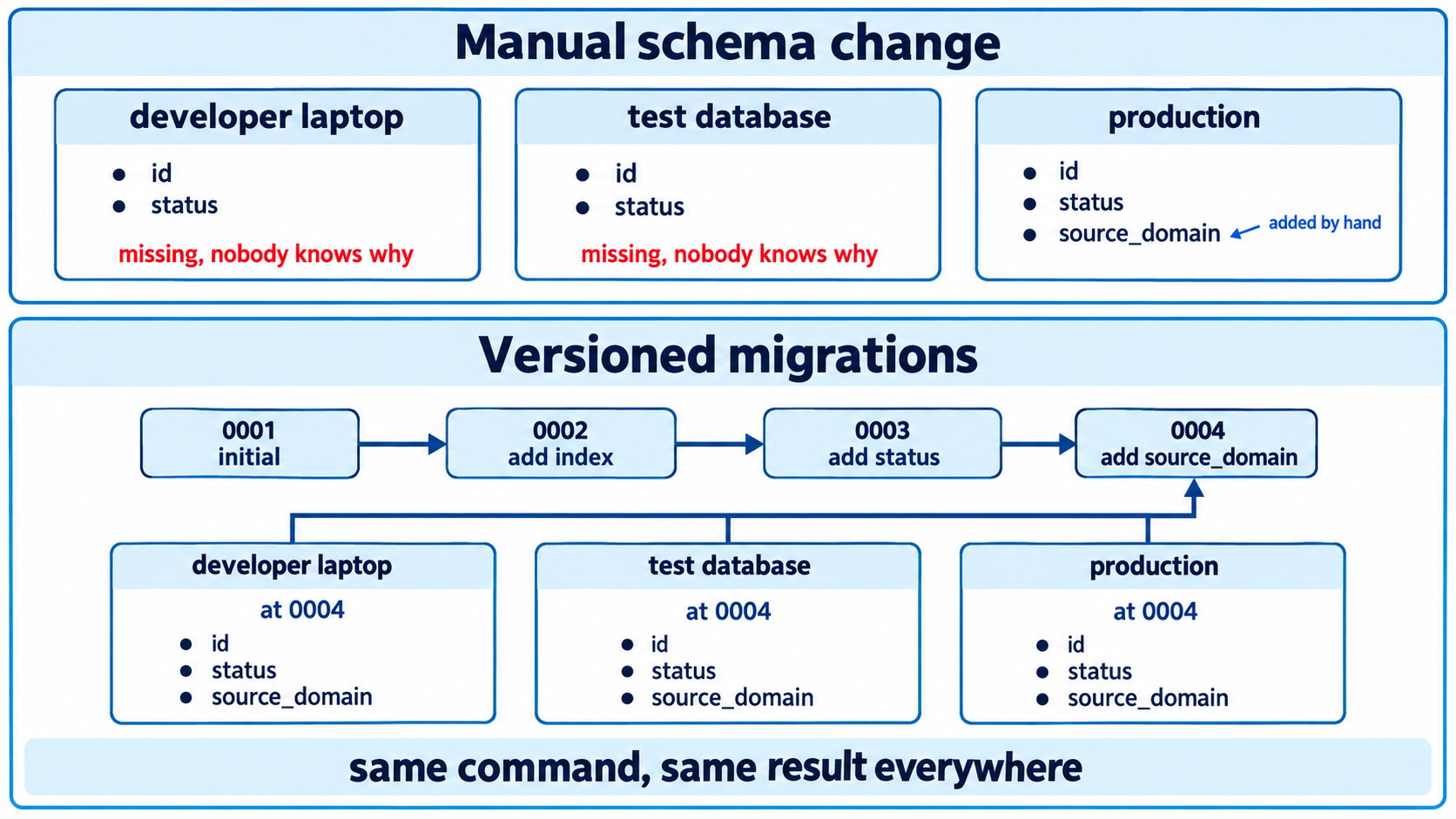
Practices that keep migrations safe
Always review an autogenerated migration. Autogeneration compares your models to the database and guesses. It detects added and removed columns well. It sees a renamed column as a drop plus an add, which destroys the data, and it misses some constraint and type changes entirely. Read every generated file before committing it.
Write the downgrade. Autogeneration usually produces one, and it is worth checking that it is correct, because the moment you need it is a bad moment to discover it is wrong. Accept that some downgrades genuinely cannot restore dropped data, and say so in a comment rather than pretending.
Separate schema changes from data changes when both are needed. A migration adding a column and backfilling two million rows holds a lock for the duration of the backfill. Add the column in one migration, backfill in a separate script or a batched migration, and add any constraint in a third once the data is in place.
Make migrations safe against running code. During a deployment, the old and new versions of your application both run for a period, so the schema must work with both. The pattern is expand then contract: add the new column as nullable, deploy code writing to both old and new, backfill, deploy code reading only the new, and only then drop the old column in a later migration. Dropping a column in the same release that stops using it will break every instance still running the previous version.
Run migrations as a deliberate deployment step, not automatically at application startup. Automatic startup migrations mean several instances starting at once may race, and a failed migration takes down the application rather than failing a clearly identified step.
Test migrations on a copy of production data. A migration that runs in a second on an empty test database can take an hour on a real table, and locking behaviour differs entirely at that scale.
One more thing worth knowing. Migrations and the repository pattern are complementary but not the same. The repository hides which database you are using. Migrations manage the schema of the one you chose. If your repository has both SQLite and Postgres implementations, note that some migrations expressible in Postgres have no SQLite equivalent, which is another reason the integration suite should run against the database you actually deploy.