Lesson 1: Toolchain
The problem this lesson solves
You finish a project. You run pip freeze > requirements.txt and commit it. A colleague clones the repository, installs, and it works. Two months later a new hire tries the same thing and gets a TypeError deep inside a library nobody has touched.
Here is what happened. Your requirements.txt listed pandas==2.1.0, which is precise. But pandas depends on numpy, and your file either did not mention numpy or listed whatever version you happened to have at the time. When the new hire installed, the installer resolved numpy to a newer release with a behaviour change. Your direct dependency was pinned. Your dependency's dependency, called a transitive dependency, was not.
The core lesson: an install that succeeds is not the same as an environment that matches. Three things vary between machines, and any one of them will break you.
- The Python interpreter version
- The exact version of every package, direct and transitive
- Everything outside Python, meaning system libraries, compilers, and the operating system
A lockfile solves the first two. A container solves the third. This lesson covers the first two. Lesson 6 covers the third.
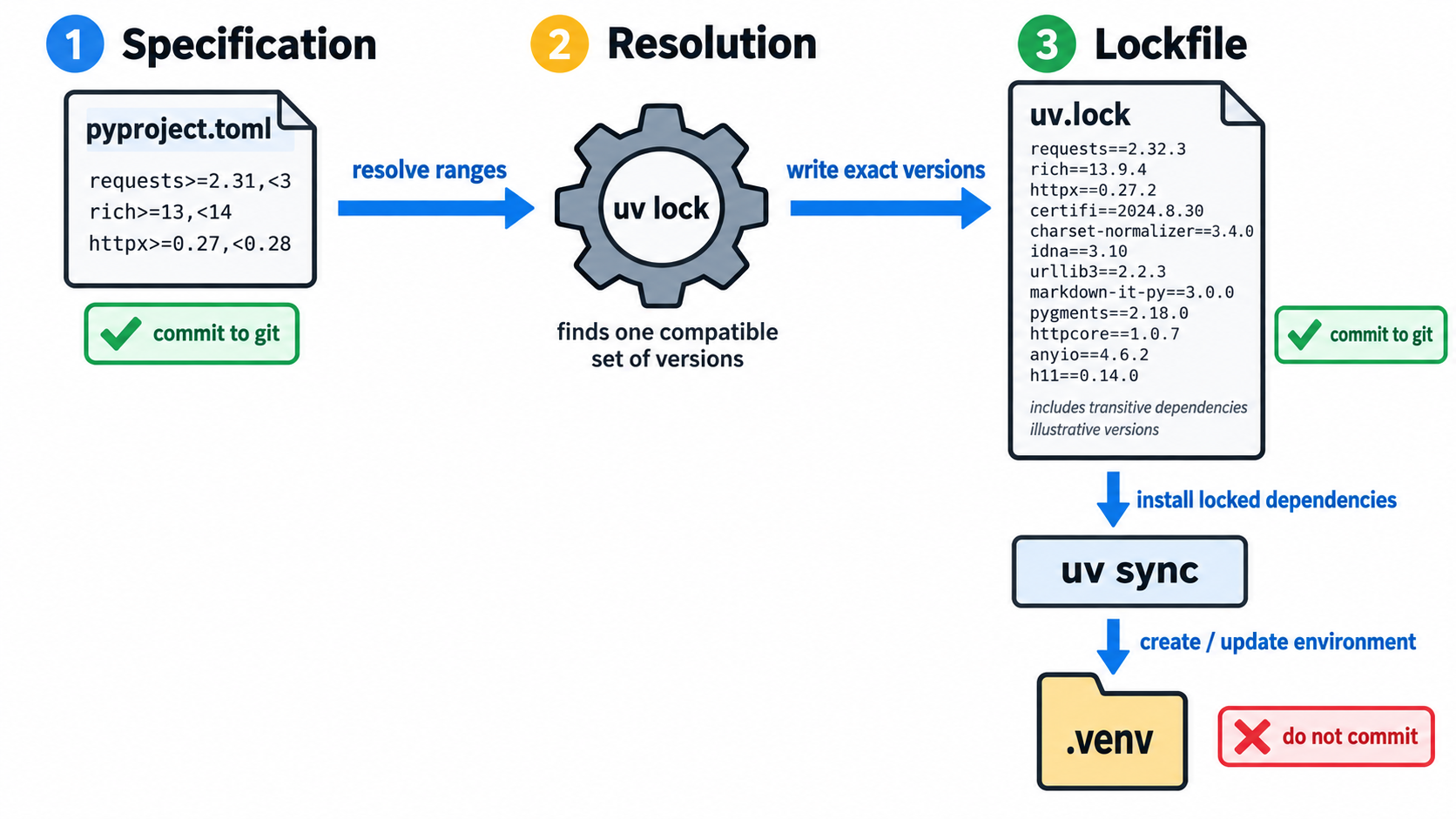
Keep one distinction in mind throughout, because tools blur it. Your dependency specification says what your project needs, loosely: "pandas 2.x or newer". Your lockfile says what was actually installed, exactly: "pandas 2.3.1, numpy 2.1.4, python-dateutil 2.9.0.post0, and forty other packages at these precise versions with these file hashes". You write the first by hand. A tool generates the second. Both belong in git.
uv for environments, dependency resolution, and lockfiles
uv is a Python package and project manager written in Rust. It replaces the jobs previously spread across pip, virtualenv, pyenv, pip-tools, and pipx. It is fast enough that installing a large dependency tree takes seconds rather than minutes.
Speed matters more than it first appears. When creating a fresh environment takes four minutes, you avoid doing it, and you let your local environment drift away from what the repository describes. When it takes four seconds, you delete and recreate environments freely, which is exactly the habit that keeps a project reproducible.
Installing uv. It ships as a standalone binary and does not need an existing Python installation.
# macOS and Linux
curl -LsSf https://astral.sh/uv/install.sh | sh

# Windows PowerShell
powershell -c "irm https://astral.sh/uv/install.ps1 | iex"
Confirm it worked:
uv --versionYou should see something like uv 0.12.0.
Managing Python itself. uv installs and manages interpreters, so you do not need a separate version manager.
uv python install 3.12          # install a specific version
uv python list                  # see what is available and installed
These live in uv's own directory. They do not disturb the Python that your operating system uses for its own purposes, which you should never install project packages into.
Starting a project.
uv init recipe-extractor
cd recipe-extractor
uv python pin 3.12
uv init creates a small skeleton: a pyproject.toml, a .python-version file, a starter module, and a git repository. uv python pin writes 3.12 into .python-version, so anyone using uv in this directory gets 3.12 regardless of their system Python. That closes the first of the three sources of variation.
Adding dependencies.
uv add httpx
uv add "pydantic>=2.0"
uv add --dev pytest ruff mypy
Each uv add does four things. It resolves a compatible set of versions across your entire dependency graph. It records the requirement in pyproject.toml. It writes the exact resolved result into uv.lock. It installs into a .venv folder that it creates and manages for you.
The --dev flag matters. pytest is needed to develop the project but not to run it in production. Keeping that separation means your production install stays smaller and has a smaller security surface.
Running code.
uv run python -m recipe_extractor
uv run pytest
uv run guarantees the environment matches the lockfile before executing, then runs your command inside it. There is no activation step and no way to forget one. If you added a dependency and have not installed it yet, uv run installs it first.
You can still activate the environment by hand if you prefer, since .venv is an ordinary virtual environment. But uv run is what belongs in scripts, CI configuration, and documentation, because it cannot be half done.
The commands you will use daily.
uv add <package>                  # add a dependency
uv remove <package>               # remove one
uv sync                           # make the environment match the lockfile exactly
uv lock                           # re-resolve and update the lockfile
uv lock --upgrade-package httpx   # update one package only
uv run <command>                  # run inside the project environment
uv tree                           # show the dependency tree
uv sync is the one to remember. It is what a colleague runs after cloning and what CI runs before tests. It installs exactly what the lockfile says, with no resolution and no surprises. It also removes anything present in your environment that the lockfile does not list, and that second behaviour is what stops local drift.
Common mistakes with uv.
Committing .venv. It is large, machine specific, and regenerable. It belongs in .gitignore, and uv init puts it there for you.
Editing uv.lock by hand. It is generated output. Change pyproject.toml and run uv lock.
Mixing pip install into a uv project. Installing with pip puts packages into the environment that the lockfile does not know about. The next uv sync removes them, and you get a confusing failure. Use uv add.
pyproject.toml as the single source of truth
Python projects once scattered configuration across setup.py, setup.cfg, requirements.txt, .flake8, pytest.ini, mypy.ini, and more. pyproject.toml replaced almost all of it with one standardised, readable file.
[project]
name = "recipe-extractor"
version = "0.1.0"
description = "Extracts structured recipes from unstructured text"
requires-python = ">=3.12"
dependencies = [
    "httpx>=0.28",
    "pydantic>=2.0",
    "pydantic-settings>=2.0",
]

[dependency-groups]
dev = [
    "pytest>=8.0",
    "ruff>=0.16",
    "mypy>=2.0",
    "pre-commit>=4.0",
]

[build-system]
requires = ["hatchling"]
build-backend = "hatchling.build"

[tool.ruff]
line-length = 100

[tool.ruff.lint]
select = ["E", "F", "I", "UP", "B", "SIM"]

[tool.mypy]
python_version = "3.12"
strict = true
Reading it section by section:
[project] holds standardised metadata that any modern Python tool understands. requires-python is a real constraint rather than documentation. Installing on 3.11 fails with a clear message instead of producing a mysterious syntax error later.
dependencies lists what the project needs in order to run. Note the loose ranges. This is deliberate and is the counterpart to the lockfile. The specification says what is acceptable; the lockfile records what was chosen. If you pin exact versions here as well, you can never accept a security patch without editing the file by hand.
[dependency-groups] holds requirements that are not needed at runtime. uv sync installs the dev group by default for local work, and a production install can skip it.
[build-system] tells packaging tools how to build your project. You will rarely touch it.
[tool.*] sections configure other tools. Ruff, mypy, pytest, and most modern tooling read their settings from here. That is why the file is described as the single source of truth. It is not only dependencies, it is the project's whole configuration.
Version specifier syntax. You will meet these constantly.
| Specifier | Meaning |
|---|---|
httpx>=0.28 | 0.28 or anything newer |
httpx>=0.28,<1.0 | at least 0.28, below 1.0 |
httpx==0.28.1 | exactly this version |
httpx~=0.28.1 | 0.28.1 or a newer patch, but below 0.29 |
For applications, >= with an upper bound where you know a breaking change is coming is a sensible default. Save == for the lockfile, which is generated rather than written.
Dependency pinning and reproducible installs
What the lockfile actually contains. Open uv.lock and you will find, for every package in your dependency graph, direct and transitive alike, the exact version, the source it came from, and cryptographic hashes of the files.
The hashes are the part people miss. They mean an install is not merely "the same version numbers" but "byte identical files". If a package on the index were replaced by a malicious build published under the same version number, the hash check fails and the install stops.
A reproducible install in practice.
git clone https://github.com/example/recipe-extractor
cd recipe-extractor
uv sync
Three commands, and the environment matches. No README section titled "known setup issues".
In CI, be stricter:
uv sync --locked--locked fails if the lockfile is out of date relative to pyproject.toml instead of quietly re-resolving. That turns "someone added a dependency and forgot to commit the lockfile" from a mystery into a build failure with an obvious message.
Updating dependencies deliberately. Reproducibility does not mean never updating. It means updating as a deliberate event.
uv lock --upgrade-package httpx     # one package
uv lock --upgrade                   # everything within your declared ranges
Run the tests, review the lockfile diff, then commit. The update becomes a reviewable commit you can revert, rather than something that happened silently to whoever installed most recently.
The nuance worth knowing. Lockfiles pin Python packages. They do not pin what those packages were compiled against. A package containing compiled C or CUDA code can behave differently on a different operating system, or with different system libraries installed, even at an identical version. This is not a flaw in uv. It is the boundary of what package management can control, and it is exactly where containers take over in Lesson 6.
Project skeleton and the src/ layout
There are two ways to arrange a Python project. The difference looks cosmetic and is not.
Flat layout:
recipe-extractor/
├── pyproject.toml
├── recipe_extractor/
│   ├── __init__.py
│   └── parser.py
└── tests/
    └── test_parser.py
src layout:
recipe-extractor/
├── pyproject.toml
├── src/
│   └── recipe_extractor/
│       ├── __init__.py
│       └── parser.py
└── tests/
    └── test_parser.py
The only change is one directory level. Here is why it matters.
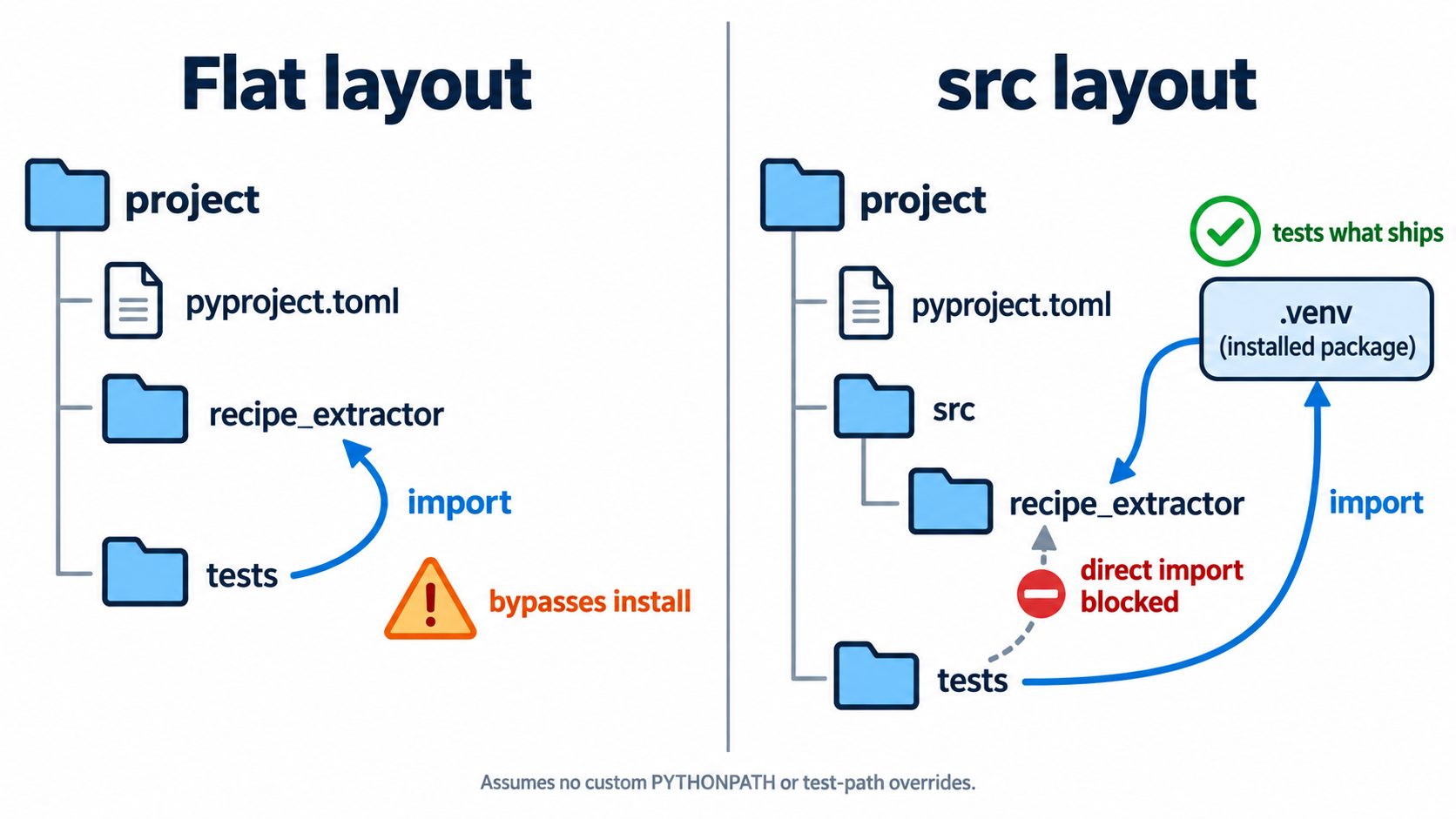
Python automatically puts the current working directory on its import path. In the flat layout, running pytest from the project root means import recipe_extractor finds the folder sitting right there, whether or not the package is actually installed correctly. Your tests pass against the source directory.
Then you build and ship the package, and a file you forgot to include is missing. It worked locally because local was never testing the installed thing.
The src/ layout makes that impossible. src is not a package, and src/recipe_extractor is not directly importable from the project root. The only way your tests can import the code is if the package is genuinely installed into the environment. You test what you ship.
This is not a theoretical concern. Missing data files, modules absent from the build, and packages that import fine locally but fail after installation are all common, and the src layout catches every one of them at the moment you write the code rather than after release.
The full skeleton. This is the structure used throughout the course.
recipe-extractor/
├── .env                     # local secrets, never committed
├── .env.example             # documents required variables, committed
├── .gitignore
├── .python-version
├── .pre-commit-config.yaml
├── pyproject.toml
├── uv.lock
├── README.md
├── src/
│   └── recipe_extractor/
│       ├── __init__.py
│       ├── config.py
│       └── parser.py
└── tests/
    └── test_parser.py
To convert a fresh uv init project into this shape:
mkdir -p src/recipe_extractor tests
mv recipe_extractor/* src/recipe_extractor/ 2>/dev/null || true
rmdir recipe_extractor 2>/dev/null || true
uv sync
One mistake worth naming. Do not create src/__init__.py. src is a container directory, not a package. Adding that file makes your import path src.recipe_extractor, which is wrong and will confuse every tool you use.