Lesson 4: MCP
What MCP is and why it exists
Every tool you write with the registry above is bound to your application. Someone else's file search tool, database connector, or ticketing integration cannot be dropped into your agent, and yours cannot be used in theirs.
The Model Context Protocol standardises the interface between an application using a model and a process providing capabilities to it. Write a tool once as an MCP server and any MCP-speaking client can use it.
Servers, tools, resources, and transports
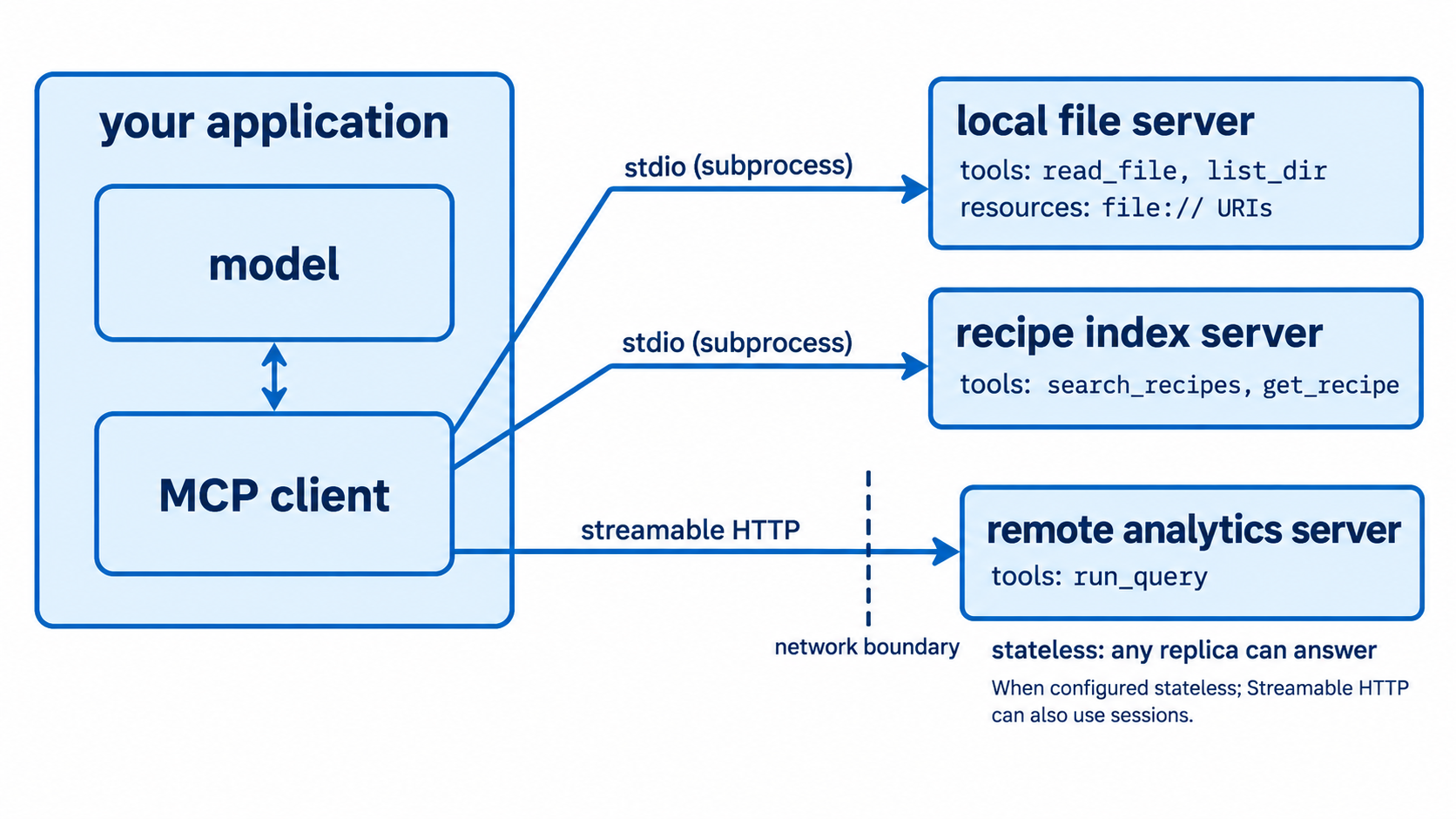
A server exposes capabilities. It is an ordinary process, run locally as a subprocess or hosted over HTTP.
A client connects to servers and makes their capabilities available to the model. Your application is the client.
Tools are functions the model can call, exactly like the registry in Lesson 3.
Resources are readable data identified by URI, such as a file or a database record. The distinction from tools is intent: a tool performs an action, a resource provides content. In practice, use a resource when the model needs to read something and a tool when it needs to do something.
Prompts are reusable templates a server can offer, which connects to the prompt module from Module 3.
Transports are how client and server communicate. Two matter now.
stdio runs the server as a subprocess and communicates over standard input and output. It is the right choice for local tools: no network, no ports, and the server's lifetime is tied to the client's.
Streamable HTTP is the transport for remote servers. It is what you deploy. The older HTTP with SSE transport is deprecated and should not be used for anything new.
The significant recent change is that the protocol has moved to a stateless model, removing the session that previously tied a client to a particular server instance. The practical consequence is operational: a modern MCP server can sit behind an ordinary round-robin load balancer without sticky sessions. When a server genuinely needs to carry state across calls, the current guidance is to have a tool return an explicit handle and have the model pass it back as an argument, which keeps the state visible in the conversation rather than hidden in the transport.
Consuming an MCP server from Python
import asyncio
from mcp import Client


async def main() -> None:
    async with Client("http://localhost:8000/mcp") as client:
        tools = await client.list_tools()
        result = await client.call_tool("search_recipes", {"query": "carbonara"})
        print(result.structured_content)


asyncio.run(main())
A URL means streamable HTTP. The same client can launch a local server as a stdio subprocess instead, which is the usual choice during development.
Integrating with your own registry. The important design point is that MCP tools should flow into the same dispatch and validation path as your local ones, not around it.
async def register_mcp_tools(registry: ToolRegistry, client: Client) -> None:
    """Adapt remote MCP tools into the local registry, keeping local policy."""
    for tool in await client.list_tools():
        registry.register(
            RegisteredTool(
                name=f"mcp__{tool.name}",
                args_model=model_from_json_schema(tool.name, tool.input_schema),
                handler=make_mcp_handler(client, tool.name),
                timeout_seconds=15.0,
                requires_approval=is_write_tool(tool.name),
            )
        )
Three things this preserves. Names are prefixed, so a remote tool cannot shadow or impersonate a local one. Your timeout and approval policy still applies, since the server's opinion about whether its tool needs approval is not authoritative for your application. And every call still passes through your validation and your loop guard.
That last point is worth stating plainly: an MCP server is a third party in your agent's execution path. It sees the arguments you send, and its results enter your model's context. Lesson 5 covers why that matters.
Exposing your own tools as an MCP server
Turning the recipe index into a server makes it usable by any MCP client, including editors and desktop applications.
from mcp.server import MCPServer

server = MCPServer("recipe-index")


@server.tool()
def search_recipes(query: str, max_results: int = 5) -> list[dict]:
    """Search the recipe corpus by ingredient or dish name."""
    return index.search(query, limit=max_results)


@server.tool()
def get_recipe(recipe_id: str) -> dict:
    """Fetch one recipe by its identifier."""
    return index.get(recipe_id)


if __name__ == "__main__":
    server.run(transport="stdio")
The schema is derived from the type hints, and the description comes from the docstring, which is the same single-definition principle from Lesson 3.
Three things to get right when writing a server.
Docstrings are prompts. They are what a model reads to decide whether to call your tool, so write them for that audience rather than for a developer browsing the code.
Validate inputs inside the tool. Your server may be called by clients you did not write, so it is a trust boundary in its own right.
Return errors as content rather than raising where the client can act on them, for the same reason Lesson 3 gave.
Decide what not to expose. A server is an interface for arbitrary clients, and any tool you expose can be called by any model connected to any client. Exposing a general purpose "run this SQL" tool means exposing your database to whatever is on the other end. Expose specific, bounded capabilities.