Lesson 6: Containers
Why "works on my machine" is a dependency problem
You have pinned Python and every package with hashes. Your colleague still cannot run the project. Why?
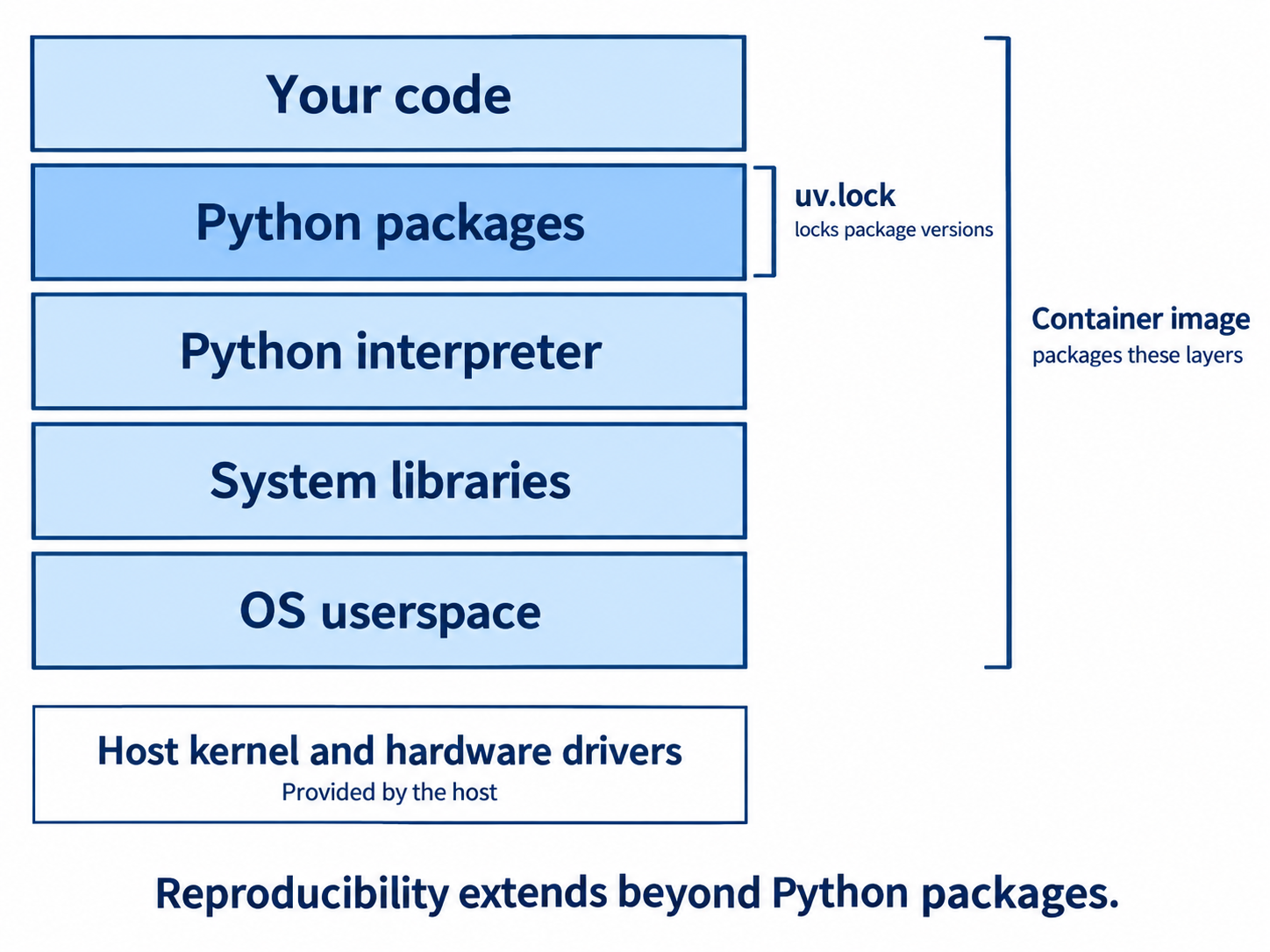
Because some things live outside Python entirely:
- System libraries that packages link against, such as
libpqfor Postgres drivers orlibjpegfor image handling - Compilers and build tools needed for packages that have no prebuilt wheel for your platform
- CUDA drivers and versions, which matter enormously for GPU work
- The operating system itself, and its version
"Works on my machine" is not stubbornness. It is an accurate report that the machine is part of the dependency set, and until now it was the only part not captured in the repository.
A container captures it. You describe the whole environment, meaning the base operating system, system packages, Python, your dependencies, and your code, as a file. That description builds into an image that runs identically anywhere the container runtime runs.
This completes the picture from Lesson 1. The lockfile closed variation sources one and two. The container closes the third.
A minimal Dockerfile
FROM python:3.12-slim

# Install uv by copying its binary from the official image
COPY --from=ghcr.io/astral-sh/uv:latest /uv /usr/local/bin/uv

WORKDIR /app

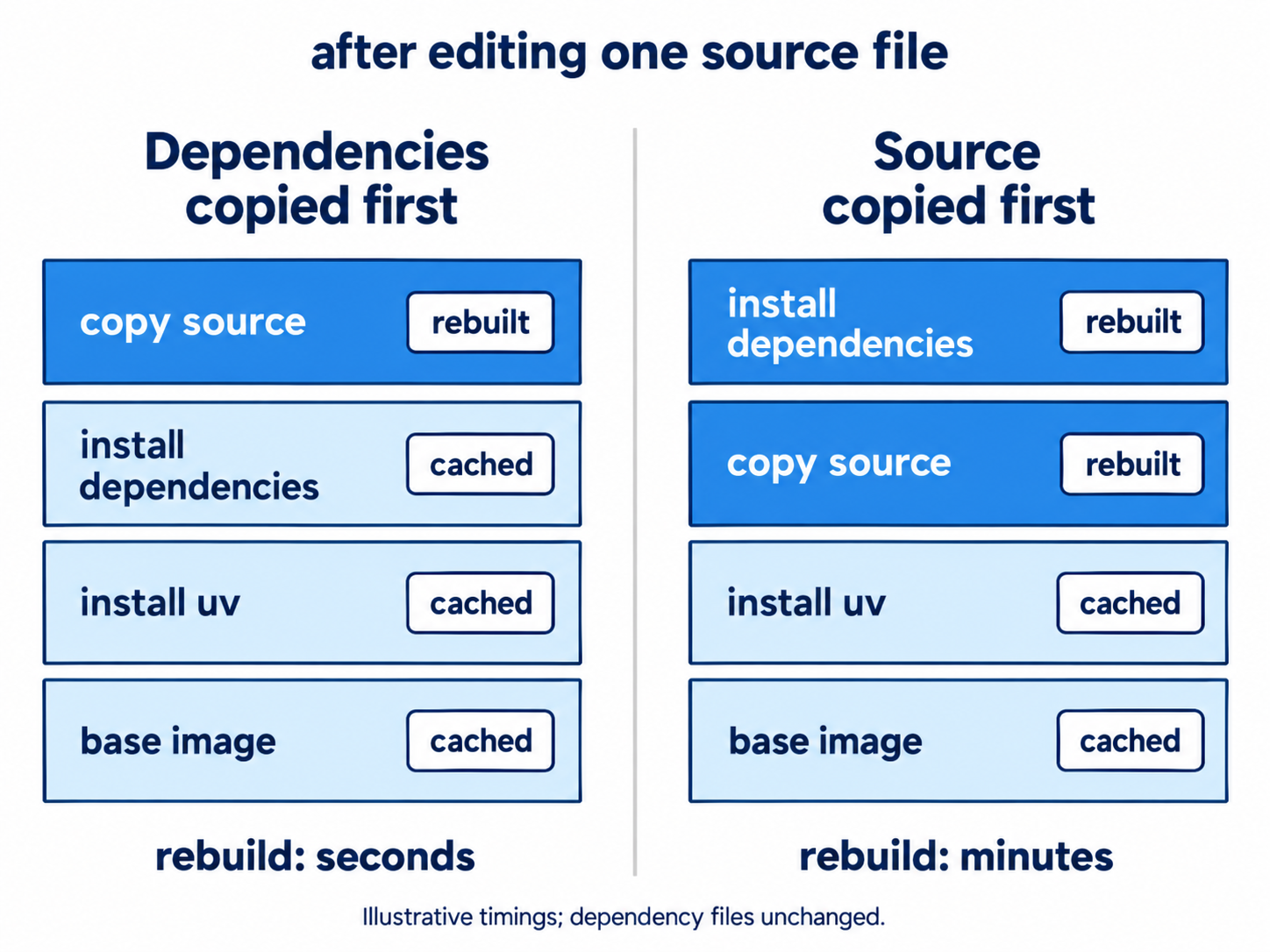
# Copy dependency files first, on their own, so this layer caches
COPY pyproject.toml uv.lock ./
RUN uv sync --locked --no-dev

# Now copy the source, which changes far more often
COPY src/ ./src/

ENV PATH="/app/.venv/bin:$PATH"

CMD ["python", "-m", "recipe_extractor"]
Line by line:
FROM python:3.12-slim selects the base image. The slim variant is a smaller Debian build and a good default. The full image is large. The alpine variant is smaller still but uses a different C library, which causes compiled Python packages to build from source, often slowly and sometimes not at all.
COPY --from=... pulls the uv binary from its official image rather than installing it with a script. This is fast and version controlled.
COPY pyproject.toml uv.lock ./ placed before COPY src/ is the single most important thing in the file. Docker caches each instruction as a layer and reuses cached layers when nothing that feeds them has changed. Dependencies change rarely and your source changes constantly. Installing dependencies before copying source means an ordinary code edit rebuilds only the last two layers instead of reinstalling everything. Reversing these two lines can turn a five-second rebuild into a three-minute one.
uv sync --locked --no-dev installs exactly the lockfile, fails if it is stale, and skips development tools. A production image should not contain pytest.
ENV PATH=... puts the virtual environment first on the path, so python means the project's interpreter.
Add a .dockerignore so the build context stays small and local artifacts do not leak in:
.venv/
.git/
.env
__pycache__/
*.pyc
Note .env in that list. Secrets are injected at run time and never baked into an image, because an image is a distributable artifact and anything inside it travels wherever it goes.
Build and run.
docker build -t recipe-extractor .
docker run --env-file .env recipe-extractor
When containers are worth it
Reach for a container when you are deploying a service, when you have GPU or CUDA dependencies, when you have non-Python system requirements, when onboarding people onto a complex project, or when CI must match production exactly.
Do not reach for one by reflex for a solo script, a pure-Python library with no system dependencies, or fast iterative work where the rebuild loop slows you down. uv plus a lockfile is genuinely enough for a large share of projects, and adding containers where they are not needed adds real friction. Add them at the point where the environment has escaped Python's control, because that is when they start earning their cost.