Lesson 4: Timeouts
Connect, read, and total
A request without a timeout can wait forever. This is not hypothetical: a connection that is accepted and then never answered leaves your program blocked indefinitely, holding a worker, a connection, and its place in the pipeline. It is the failure from the overnight run at the start of this module, and it is the one that produces no error at all, only silence.
There is more than one kind of timeout, and confusing them causes both spurious failures and hangs.
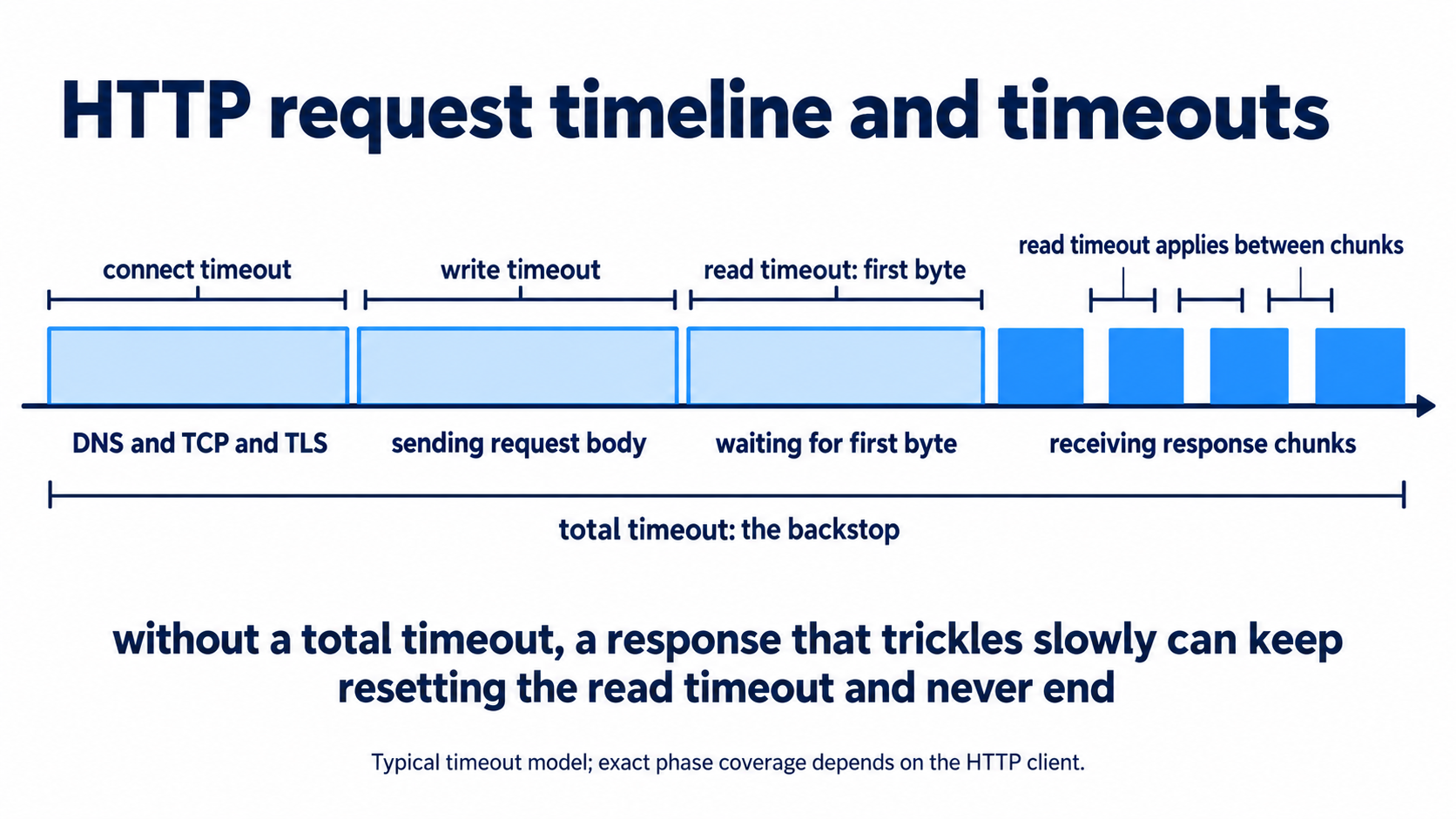
Connect timeout limits how long to wait for the connection to be established. This covers DNS resolution, the TCP handshake, and TLS negotiation. It should be short, because establishing a connection either happens quickly or is not going to happen. Two to ten seconds is typical.
Read timeout limits how long to wait for data once connected. Importantly, it usually applies between chunks of data rather than to the whole response, so a slow but steadily streaming response does not trip it. This should be sized to what the operation genuinely needs, which for a model generating a long response may be much longer than you would allow for a database query.
Write timeout limits how long sending your request body may take, which matters when uploading a large payload such as a base64 image.
Total timeout limits the whole operation from start to finish. This is the one people forget, and it is the backstop. Without it, a response that trickles one byte every read-timeout-minus-one-second continues forever while never violating the read timeout.
import httpx

timeout = httpx.Timeout(
    connect=5.0,      # establishing the connection
    read=60.0,        # waiting between chunks of the response
    write=10.0,       # sending the request body
    pool=5.0,         # waiting for a free connection from the pool
)

client = httpx.Client(timeout=timeout)
Note pool, which is specific to clients that reuse connections. If every connection in the pool is busy, a request waits for one, and without a pool timeout that wait is unbounded. This is a real source of hangs in concurrent code, and it looks nothing like a network problem when it happens.
Every network call gets one
The rule is absolute, and the reason is that the default in most libraries is no timeout at all.
httpx.get(url)                              # no timeout by default in some configurations
requests.get(url)                           # no timeout by default
socket.create_connection(address)           # no timeout by default
database.execute(query)                     # depends entirely on the driver
A call without a timeout is not fast in the good case and slow in the bad case. It is fast in the good case and infinite in the bad case, and infinite is a category difference.
Choose values by what the operation needs, not by a global default. A single embedding call and a long document summarisation are different operations, and a timeout tuned for one is wrong for the other.
EMBEDDING_TIMEOUT = httpx.Timeout(connect=5.0, read=30.0, write=10.0, pool=5.0)
GENERATION_TIMEOUT = httpx.Timeout(connect=5.0, read=300.0, write=10.0, pool=5.0)
Note that the connect timeout is the same in both, because establishing a connection has nothing to do with what you are asking for. Only the read timeout changes.
How timeouts and retries interact. They multiply, and it is easy to build something that takes far longer than intended.
Five attempts at a 300 second read timeout, with backoff waits between them, produces a worst case of well over half an hour for one document. If your job has its own deadline, that single document can consume it.
Two corrections. Set a total budget for the operation, not just per attempt:
def call_with_budget(func, *, total_budget: float = 120.0):
    """Retry until the budget is exhausted rather than a fixed attempt count."""
    deadline = time.monotonic() + total_budget
    attempt = 0
    while True:
        try:
            return func()
        except Exception as exc:
            attempt += 1
            if not is_retryable(exc):
                raise
            delay = compute_delay(exc, attempt, base_delay=1.0)
            if time.monotonic() + delay >= deadline:
                raise ProviderTimeoutError("retry budget exhausted") from exc
            time.sleep(delay)
Note time.monotonic() rather than time.time(). Monotonic time cannot go backwards, so a clock adjustment during your job does not produce a negative elapsed time or an accidental infinite loop.
And use shorter timeouts on retries than on the first attempt where the operation allows it, since an attempt that already timed out once is unlikely to be quick on the second.