Lesson 4: Debugging Fundamentals
When something breaks, the difference between five minutes and an afternoon is usually whether you read the error precisely or guessed at it.
Reading a traceback: innermost frame and chained causes
When Python raises an uncaught exception it prints a traceback, the chain of function calls that led to the failure. Read correctly, it usually points at the exact line you need to change. Read carelessly, it is a wall of text that invites guessing.
Here is a realistic one:
Traceback (most recent call last):
  File "/app/src/recipe_extractor/cli.py", line 42, in main
    recipes = load_all(args.input_dir)
              ^^^^^^^^^^^^^^^^^^^^^^^^
  File "/app/src/recipe_extractor/loader.py", line 18, in load_all
    return [parse(path) for path in paths]
            ^^^^^^^^^^^
  File "/app/src/recipe_extractor/parser.py", line 55, in parse
    servings = int(data["servings"])
                   ~~~~^^^^^^^^^^^^
KeyError: 'servings'
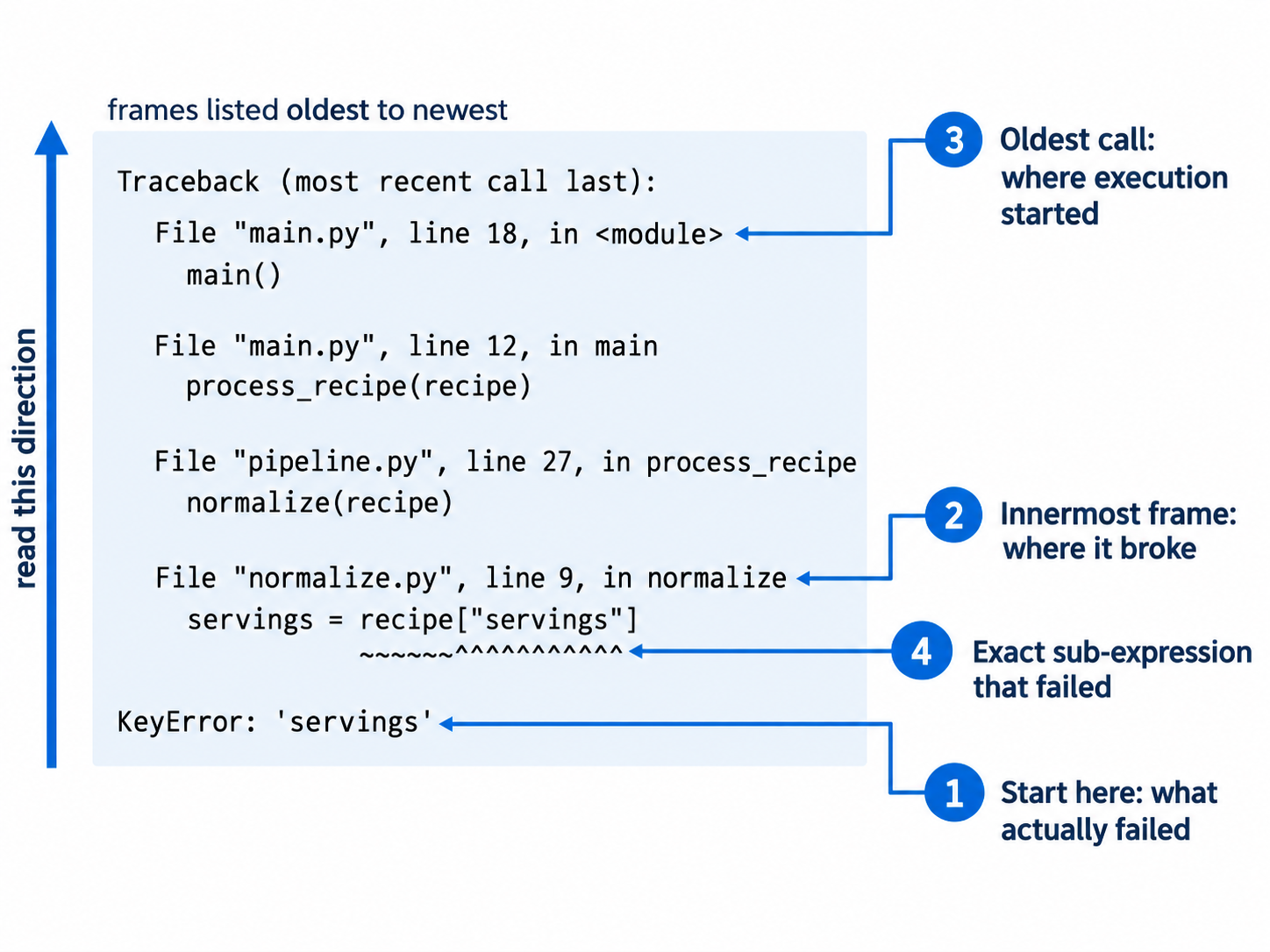
Start at the bottom. The last line is the actual error: KeyError: 'servings'. Everything above it is the path taken to reach that point.
The frames are ordered oldest to newest. A frame is one entry in the traceback, representing a single function call. The top frame is where execution started. The bottom frame, called the innermost frame, is where it broke. The phrase "most recent call last" at the top is telling you exactly this, and it is why reading from the bottom is correct.
Find the lowest frame in code you control. Here that is parser.py line 55, which is both the innermost frame and yours, so that is where to look. When the deepest frames sit inside a library, scan upward for the last file with your project's path. That is your boundary, and nine times out of ten the problem is the value you passed across it.
Read the caret markers. The ^^^ and ~~~ under each line point at the precise sub-expression. On line 55 they sit under data["servings"], not under int(...), so the dictionary lookup failed rather than the integer conversion. That distinction saves you from investigating the wrong half of the line.
The error is now fully specified. A dictionary named data in the parse function has no servings key. The next question is not "why does int() fail" but "which input document lacks a servings field, and what should happen when one does".
Chained causes. Real code often produces two tracebacks joined by a sentence, and the connector tells you which kind of chaining occurred.
"The above exception was the direct cause of the following exception" is produced by raise NewError(...) from original. This is deliberate. Someone caught a low-level error and re-raised it as a meaningful domain error.
try:
    config = json.loads(raw_config)
except json.JSONDecodeError as exc:
    raise ConfigurationError(f"Config file at {path} is not valid JSON") from exc
The reader gets both halves: the friendly explanation and the technical origin.
"During handling of the above exception, another exception occurred" is a smell. It means a second error happened inside an except block while the first was being handled. Frequently the second error is a bug in your error handling, and it can hide the original problem entirely.
try:
    result = fetch_recipe(url)
except httpx.HTTPError:
    logger.error(f"Failed to fetch {url}: {response.status_code}")
response was never assigned, because the failure happened during the call itself. Your handler raises NameError, and the useful HTTP error is buried above it. When you see this connector, read the first traceback for the real problem, then fix the handler.
Reading order, summarised.
- The bottom line, for the exception type and message
- The innermost frame you own, for where to look
- The caret markers, for which part of the line
- If chained, which connector it is, and read the earlier traceback if it says "during handling"
Distinguishing your bug from a library's bug
The traceback ends deep inside a library you did not write. The instinct is to suspect the library. Resist it. On any established package, the odds overwhelmingly favour the bug being yours.
Work through this in order.
1. Find the boundary. Locate the last frame with your project's path. What did you pass across it? Most apparent library bugs are a None, an empty list, or a wrong type handed to a function that reasonably assumed otherwise.
2. Read the message as a description of your input. ValueError: could not convert string to float: 'N/A' is a complete explanation of your data. The library is telling you exactly what it received.
3. Reproduce it minimally. Reduce the failure to the smallest snippet that still fails, with hardcoded values instead of your pipeline's data.
import httpx
response = httpx.get("https://example.com", timeout="30")
If five lines fail, you have something you can reason about, and often the reduction alone reveals the mistake. Here the timeout is a string.
4. Check your version against the documentation you are reading. A large share of apparent library bugs are documentation drift, where you followed a guide written for version 1.x while running 2.x. Confirm your version with uv tree and read the documentation for the version you actually have.
5. Search the exact error message. Search the literal text, minus your own file paths, rather than a paraphrase. If it is a known issue you will find it quickly, usually alongside a workaround.
6. Check the issue tracker and changelog. If a recent release broke something, someone has already reported it. The changelog also reveals intentional breaking changes, which look identical to bugs from the outside.
Only after all six steps should you conclude the library is at fault. It does happen, particularly with new releases, rarely used code paths, and small packages. But treating it as the first hypothesis wastes hours and, worse, stops you looking where the problem actually is.
When you have genuinely confirmed it, pin the last working version in pyproject.toml, add a comment saying why, open an issue with your minimal reproduction, and move on. A pinned version with an explanatory comment is a perfectly professional resolution.
dependencies = [
    # Pinned: 0.29.0 breaks streaming responses with proxies (upstream issue #4412)
    "httpx==0.28.1",
]