Part 5: Reliability in the loop
Parts 2 and 3 already ran the reliability machinery. This part slows down on each piece and on the design choices behind it.
Retries with backoff, and why idempotency comes first
Tools fail. Billing APIs time out, rate limits bite, a network blips. Inside an agent there are two very different places to handle that:
- In the loop, around the tool (
execute_tool): retry transient errors a few times with exponential backoff and jitter, and only then report failure to the model. The model never sees the two 503s in step 4 of our trace; it sees one clean invoice. - In the model's reasoning: after retries are exhausted, the model gets
{"ok": false, "retryable": true}and aREPLAN:message, and chooses another path (escalation).
Retrying in the loop is cheap (no model call); retrying through the model costs a full call each time. So retry mechanically first, and involve the model only when the failure changes the plan.
There is a trap. A timeout does not tell you whether the action happened. If issue_refund times out after the payment processor accepted it, a blind retry refunds twice. The fix is to make the action idempotent: the billing store keys refunds by charge id, so the second request returns the first refund. Real payment APIs offer the same thing as an idempotency key you send with the request. Rule of thumb: never put an automatic retry around a non-idempotent side effect.
| Situation | Use this | Why |
|---|---|---|
| Read-only tool, transient error (timeout, 503, 429) | Retry in the loop with exponential backoff and jitter, 2 to 4 attempts | Cheap, and invisible to the model |
| Bad arguments (unknown invoice, schema violation) | No retry; return the error to the model | Retrying the same input cannot succeed; the model can fix the input |
| Side-effecting tool (refund, email, write) | Idempotency key, then retries are safe | A timeout may hide a success |
| Retries exhausted | Flag a replan; let the model choose another path or escalate | The plan is now wrong, not just delayed |
Checkpointing long-running tasks
A checkpoint is the saved state of a run, written after each step, from which a new process can continue. Ours is AgentState serialized to JSON. Here is what is in the one the crash scenario left behind:
python -c "
import json
d = json.load(open('runs/m08/guards/crash_resume_ckpt.json'))
for k, v in d.items():
    print(f'{k:13}', v if not isinstance(v, (list, dict)) or k == 'plan' else f'<{len(v)} items>')
"
Code explained
- In simple words: open the checkpoint file and list what it holds, summarizing long lists.
- What happens: the checkpoint is plain JSON, so any tool can read it. Lists and dicts are shown as item counts except the plan, which is small enough to print.
Comes out:
  task_id       T-1001
  messages      <17 items>
  step          8
  input_tokens  9376
  output_tokens 377
  cost_usd      0.0016326
  llm_calls     8
  plan          {'steps': ['issue_refund', 'add_internal_note', 'reply'], 'version': 3, 'needs_replan': False}
  seen_calls    <7 items>
  fingerprints  <7 items>
  stale_steps   0
  status        done
  final         Hi, sorry about the double charge. We refunded the duplicate payment of 288.00 USD on invoice INV-2026-004512 (refund RF-00001). It goes back to your original card within 5 to 10 business days.
The whole conversation (17 messages), the counters that the guards need (seen_calls, fingerprints, stale_steps), the budget spent so far, and the plan. If any of these were missing, a resumed run would reset its guards or its budget, which is how "resumable" agents quietly overspend.
Three things make resuming safe, and our run used all three: the checkpoint holds everything the guards and budget need; external side effects are idempotent, because the crash can land between the side effect and the checkpoint; and the external world (the billing file) is re-read on resume rather than trusted from memory. Anthropic describes the same approach in its multi-agent research system post: "retry logic and regular checkpoints" so agents can "resume from where the agent was when the errors occurred" instead of restarting.
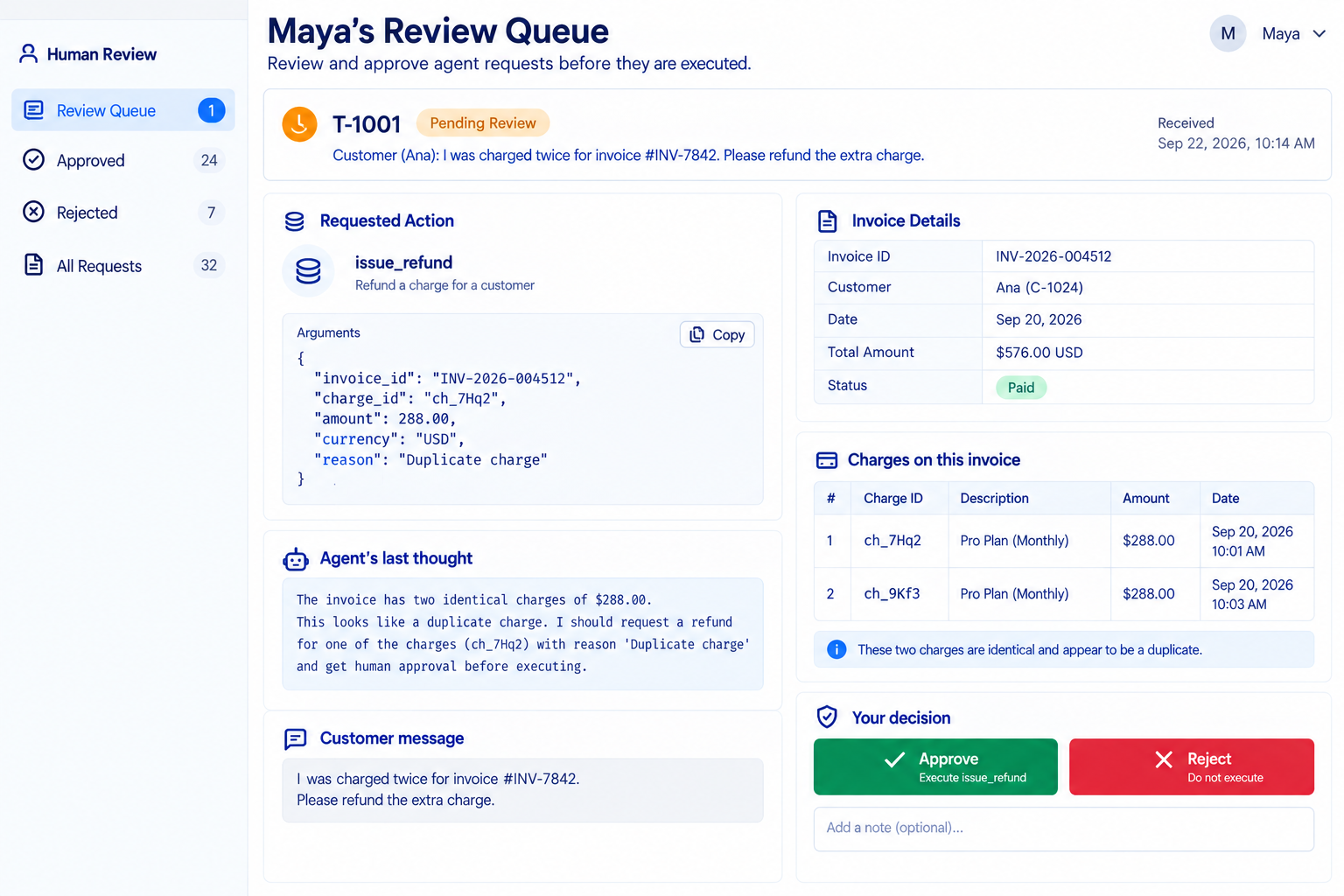
One design gap is visible in the crash trace: Maya was asked to approve the same refund twice. A production gate should record approvals durably, keyed by the exact arguments, so a replayed step finds its existing approval.
Human-in-the-loop approval gates
An approval gate is code that pauses before an irreversible action and asks a person. The important word is code: a sentence in the system prompt ("always ask before refunding") is a request to the model, while if tool.irreversible: decision = approver(...) is a guarantee. The gate in execute_tool has these properties, each for a reason:
- Default deny.
deny_allis the default approver, so a misconfigured deployment refuses rather than refunds. - Keyed on the tool, not the model's intent.
issue_refundis flaggedirreversible=True; the model cannot talk its way around the flag. - Shows the exact arguments. The approver sees
invoice_id,charge_id, andamount_usd, and approves exactly those. - Records who approved. The trace stores
approver: "human:maya". Part 8's evaluator uses that to fail runs approved by an automatic policy. - Rejection is an observation. A denial returns
{"ok": false, "denied": true}to the model, which should escalate, not retry.
Keep the number of gated actions small. If every step needs approval, reviewers click Approve without reading (Module 14 calls this reviewer fatigue), and the gate becomes decoration.
| Situation | Use this | Why |
|---|---|---|
| Irreversible or money-moving action (refund, delete, send to customer) | Code-level gate, default deny, exact arguments shown | The only guarantee that survives a wrong model decision |
| Reversible, low-impact action (internal note, tag) | No gate; log it | Gating everything trains reviewers to rubber-stamp |
| High volume of one gated action | Rules that auto-approve a narrow safe class (for example refunds under 50 USD with an exact duplicate), human for the rest | Keeps humans on the cases that need judgment |
| Approver does not respond in time | Escalate or park the task with its checkpoint | Silence is not consent |
Observability: tracing every step
A trace is the step-by-step record of one run: every model call with its tokens and cost, every tool call with its arguments, every retry, approval, checkpoint, and stop reason. Ours is JSONL, one event per line, so it streams, greps, and loads into anything. These are three real events from runs/m08/agent_trace.jsonl:
{"ts": 1789975220.226, "run_id": "T-1001", "step": 0, "type": "llm_call", "thought": "Thought: customer reports a double charge. Find the refund policy first.\nPLAN: search_kb; read_article; get_account; get_invoice; issue_refund; add_internal_note; reply", "plan": ["search_kb", "read_article", "get_account", "get_invoice", "issue_refund", "add_internal_note", "reply"], "plan_version": 1, "tool_calls": [{"name": "search_kb", "args": {"query": "charged twice"}}], "input_tokens": 787, "output_tokens": 50, "cost_usd": 0.0001481, "latency_ms": 0.0}
{"ts": 1789975220.243, "run_id": "T-1001", "step": 4, "type": "tool_retry", "tool": "get_invoice", "attempt": 1, "error": "503 billing API timeout (call 1)", "backoff_s": 0.061}
{"ts": 1789975220.311, "run_id": "T-1001", "step": 4, "type": "tool_retry", "tool": "get_invoice", "attempt": 2, "error": "503 billing API timeout (call 2)", "backoff_s": 0.119}
Code explained
- In simple words: each line is one thing that happened, with enough detail to replay the run in your head.
- What happens: every event carries
run_id(the task),step, andtype.llm_callevents carry the thought, the plan if it changed, the requested tool calls, tokens, cost, and latency (0.0 here because ScriptedLLM does not wait; a realchatfills it in).tool_retryevents carry the error and the backoff chosen, so you can see flakiness per tool. - Comes out: this is data rather than a program. Your own timestamps will differ; the structure will not.
The trace is also your first diagnostic tool. When a run ends badly, read the trace before you touch the prompt. For example, the budget_usd scenario from Part 3 left a ticket with a refund and no reply. The last four events say why:
tail -n 4 runs/m08/guards/budget_usd.jsonl | python -c "
import json, sys
for line in sys.stdin:
    e = json.loads(line)
    print(e['step'], e['type'], {k: v for k, v in e.items() if k in ('tool', 'status', 'used', 'next_call', 'cost_usd', 'preview')})
"
Code explained
- In simple words: print the last four events of the run that stopped on budget, keeping only the fields that explain the stop.
- What happens:
tailtakes the end of the JSONL file and the Python one-liner prints step, type, and a few fields. - Comes out:
  6 tool_call {'tool': 'add_internal_note'}
  6 tool_result {'tool': 'add_internal_note', 'preview': '{"saved": true, "note_count": 1}'}
  7 checkpoint {}
  7 stop {'status': 'budget_usd', 'used': 0.014571, 'next_call': 0.006006}
The internal note was written, then the guard refused call 8 because 0.014571 already spent plus 0.006006 projected exceeds 0.02. The diagnosis is "the output reserve is too conservative for this price point", not "the model is bad". Fix the budget (or route budget_usd stops to a person), not the prompt.
In production you would send the same events to a tracing system instead of a file. The common standard is OpenTelemetry; the MCP 2026-07-28 spec documents conventions for carrying OpenTelemetry trace context (traceparent, tracestate) in request _meta, so a trace can follow a call from your agent into an MCP server. Module 13 covers dashboards and retention; the rule for now is simple: if a step is not in the trace, you cannot debug it, bill it, or evaluate it.