Topic 5: Core concepts
D.1 Hosts, clients, and servers
MCP names three roles. Getting them straight early saves confusion in every later module.
- The host is the AI application the user actually runs: a desktop chat app, a code editor, a CLI agent, or the lab assistant you build in Module 6. The host owns the conversation with the model, the user interface, and the security decisions: which servers to connect to, which tool calls need the user's approval, and what data may leave the machine.
- A client is a connector inside the host that talks to exactly one server. A host that uses three servers runs three clients. In C.3, each
async with Client(...)block was one client. - A server is a program that exposes capabilities (tools, resources, prompts) over MCP. It can be a local subprocess (stdio) or a remote service (Streamable HTTP).
Why one client per server? Isolation. The specification's design principles say servers should not be able to read the whole conversation, nor "see into" other servers. Each client carries only its own server's traffic, so the notes server never sees what the calendar server returned, and the host decides what, if anything, crosses between them. It also keeps failures contained: a crashed server takes down one client, not the host.
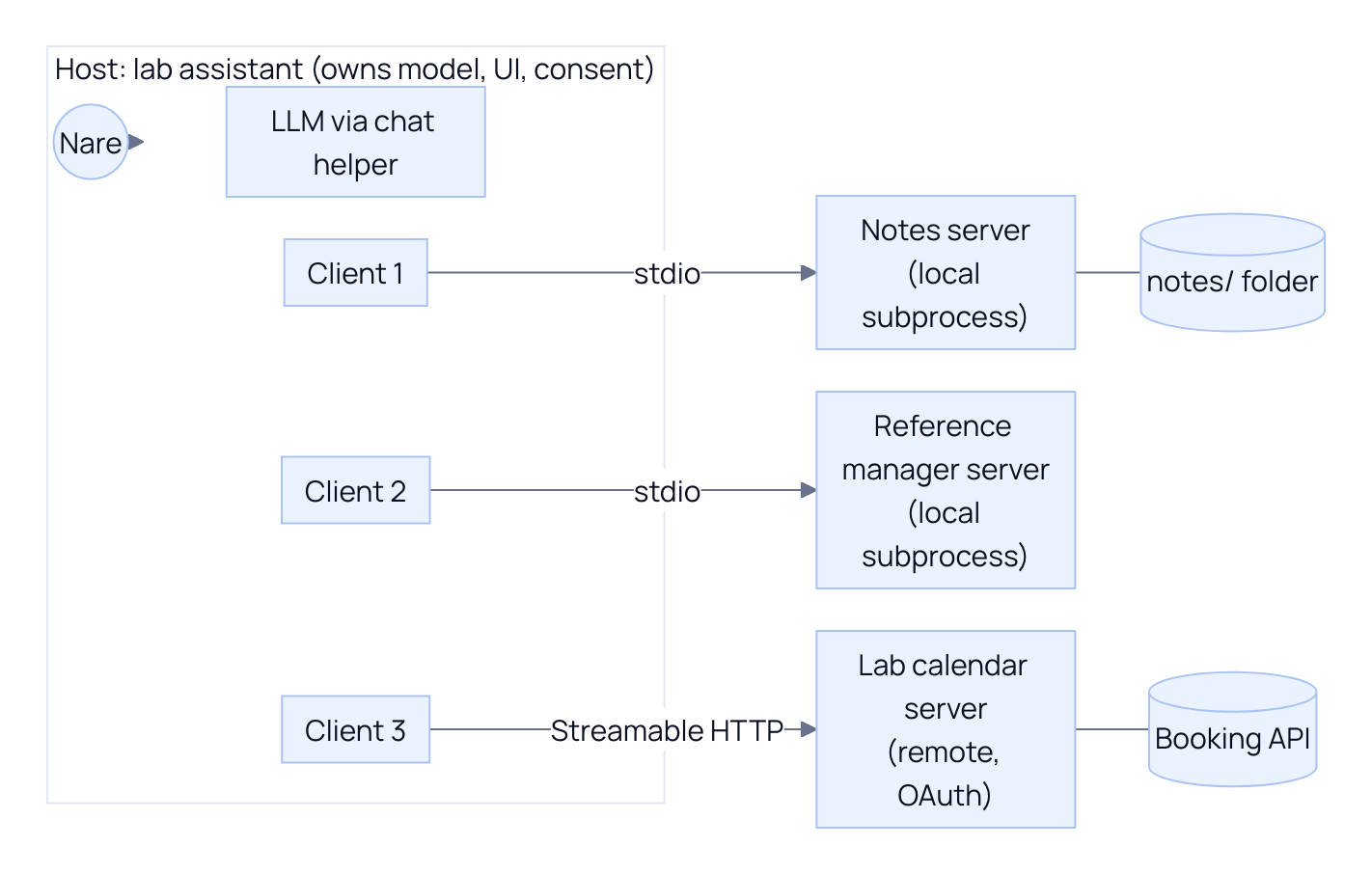
The model never talks to a server directly. The model proposes a tool call; the host decides whether to run it; the right client sends it to its server. That position in the middle is what lets a host enforce consent (Module 6) and security policy (Module 8).
D.2 JSON-RPC 2.0 as the foundation
Every MCP message is a JSON-RPC 2.0 message. JSON-RPC is a tiny, long-established convention for remote procedure calls in JSON. It has three message kinds:
| Kind | Has id? | Has method? | Purpose |
|---|---|---|---|
| Request | Yes | Yes | "Please do this", and expects exactly one response with the same id |
| Response | Yes (copied from the request) | No | Carries either result (success) or error (with a numeric code and a message) |
| Notification | No | Yes | One-way message, no response expected (for example progress updates) |
MCP adds its own rules on top. In the 2026-07-28 revision the protocol is stateless: there is no connection handshake, and every request carries its own protocol version and client capabilities inside params._meta under the keys io.modelcontextprotocol/protocolVersion and io.modelcontextprotocol/clientCapabilities. Over Streamable HTTP, a request also repeats the important routing facts in HTTP headers: MCP-Protocol-Version, Mcp-Method (the JSON-RPC method), and, for tools/call, prompts/get, and resources/read, Mcp-Name (the tool name, prompt name, or resource URI). Headers let proxies, gateways, and load balancers route and filter requests without parsing the body.
The best way to learn a wire format is to look at it. Start the server from C.2 over HTTP in the background, then send raw requests with curl.
PYTHONPATH=. python examples/m01_first_server.py --http 8010 > server.log 2>&1 &
SERVER_PID=$!
sleep 2
bash examples/m01_wire.sh
kill $SERVER_PID
Code explained
- In simple words: we start the notes server on a local port, then play the part of the client by hand, typing the exact messages a client would send.
- What happens: the first line starts the Streamable HTTP server on port 8010 and sends its logs to
server.log;$!captures its process id so we can stop exactly that process at the end withkill.sleep 2gives uvicorn time to start.m01_wire.sh(below) sends four POST requests and pretty-prints each JSON response with the HTTP status and byte counts. - Comes out: the two successful exchanges are shown and explained block by block in the rest of this section. The last two, deliberate mistakes, print:text
== tools/call without the Mcp-Name header (a deliberate mistake)
{
  "jsonrpc": "2.0",
  "id": 3,
  "error": {
    "code": -32020,
    "message": "mcp-name header does not match the request body's 'name' parameter"
  }
}
HTTP 400, 220 bytes up, 127 bytes down
== tools/list without the _meta envelope (another deliberate mistake)
{
  "jsonrpc": "2.0",
  "id": 4,
  "error": {
    "code": -32602,
    "message": "params._meta must be an object carrying the required 'io.modelcontextprotocol/protocolVersion' and 'io.modelcontextprotocol/clientCapabilities' envelope keys"
  }
}
HTTP 400, 58 bytes up, 218 bytes down
Both failures are JSON-RPC errors (an
errorobject instead of aresult), sent with HTTP 400. Code-32602is JSON-RPC's standard "Invalid params". Code-32020is MCP'sHeaderMismatch, from the range-32020to-32099that the 2026-07-28 revision reserves for the MCP specification. The messages tell you precisely what to fix. If you ever write a client by hand, these two are the errors you will meet first.
Here is the script itself.
#!/usr/bin/env bash
# Module 1: raw JSON-RPC 2.0 over Streamable HTTP (protocol revision 2026-07-28).
# Start the server first:  PYTHONPATH=. python examples/m01_first_server.py --http 8010 &
URL="${MCP_URL:-http://127.0.0.1:8010/mcp}"
META='"_meta":{"io.modelcontextprotocol/protocolVersion":"2026-07-28","io.modelcontextprotocol/clientCapabilities":{}}'

post() {  # usage: post <Mcp-Method> <Mcp-Name or ""> <json body>
  local name_header=()
  [ -n "$2" ] && name_header=(-H "Mcp-Name: $2")
  curl -sS "$URL" \
    -H 'Content-Type: application/json' \
    -H 'Accept: application/json, text/event-stream' \
    -H 'MCP-Protocol-Version: 2026-07-28' \
    -H "Mcp-Method: $1" "${name_header[@]}" \
    -w '\nHTTP %{http_code}, %{size_upload} bytes up, %{size_download} bytes down\n' \
    -d "$3" | python -c 'import json,sys; body, status = sys.stdin.read().rsplit("\n", 2)[:2]; print(json.dumps(json.loads(body), indent=2)); print(status)'
}

echo "== tools/list"
post tools/list "" '{"jsonrpc":"2.0","id":1,"method":"tools/list","params":{'"$META"'}}'

echo "== tools/call"
post tools/call search_notes '{"jsonrpc":"2.0","id":2,"method":"tools/call","params":{"name":"search_notes","arguments":{"query":"nap study","limit":1},'"$META"'}}'

echo "== tools/call without the Mcp-Name header (a deliberate mistake)"
post tools/call "" '{"jsonrpc":"2.0","id":3,"method":"tools/call","params":{"name":"search_notes","arguments":{"query":"nap"},'"$META"'}}'

echo "== tools/list without the _meta envelope (another deliberate mistake)"
post tools/list "" '{"jsonrpc":"2.0","id":4,"method":"tools/list","params":{}}'
Code explained
- In simple words: a tiny hand-made MCP client in about twenty lines of shell, so nothing is hidden behind an SDK.
- What happens:
METAholds the_metaenvelope every 2026-07-28 request needs; the client capabilities object is empty because this "client" offers nothing back to the server.post()sends one POST with the required headers:Content-Type, anAcceptheader allowing either a plain JSON reply or an SSE stream (the server chooses),MCP-Protocol-Version,Mcp-Method, andMcp-Namewhen a name is given.curl -wappends status and byte counts; the small Python one-liner pretty-prints the JSON body and then the status line. The four calls aretools/list,tools/call, and the two deliberate mistakes. - Comes out: see the previous box for the error cases and the next four blocks for the successful exchanges. Your byte counts will match; the server log in
server.logshows onePOST /mcpline per request.
The tools/list request, as the script sends it (pretty-printed here for reading):
{
  "jsonrpc": "2.0",
  "id": 1,
  "method": "tools/list",
  "params": {
    "_meta": {
      "io.modelcontextprotocol/protocolVersion": "2026-07-28",
      "io.modelcontextprotocol/clientCapabilities": {}
    }
  }
}
Code explained
- In simple words: "Hello, I speak MCP 2026-07-28 and offer nothing special; what tools do you have?"
- What happens:
jsonrpcis always"2.0".idis chosen by the client and echoed in the response so replies can be matched to requests.methodnames the operation.params._metais the per-request envelope that replaces the old connection handshake: because every request states its own version and capabilities, any server replica can answer any request with no memory of earlier ones. The HTTP headersMCP-Protocol-Version: 2026-07-28andMcp-Method: tools/listrepeat the version and method. - Comes out: the server replies with HTTP 200 and the next block. The request is 170 bytes on the wire.
The real tools/list response:
{
  "jsonrpc": "2.0",
  "id": 1,
  "result": {
    "cacheScope": "private",
    "resultType": "complete",
    "tools": [
      {
        "description": "Search the user's research notes by keyword and return the best matching notes.",
        "inputSchema": {
          "type": "object",
          "properties": {
            "query": {
              "title": "Query",
              "type": "string"
            },
            "limit": {
              "default": 5,
              "title": "Limit",
              "type": "integer"
            }
          },
          "required": [
            "query"
          ],
          "title": "search_notesArguments"
        },
        "name": "search_notes",
        "outputSchema": {
          "properties": {
            "result": {
              "items": {
                "additionalProperties": true,
                "type": "object"
              },
              "title": "Result",
              "type": "array"
            }
          },
          "required": [
            "result"
          ],
          "title": "search_notesOutput",
          "type": "object"
        }
      }
    ],
    "ttlMs": 0,
    "_meta": {
      "io.modelcontextprotocol/serverInfo": {
        "name": "notes-m01",
        "version": ""
      }
    }
  }
}
Code explained
- In simple words: the server's menu, in a format any client in any language can read.
- What happens:
id: 1matches the request.toolsholds one definition:name,description(the docstring),inputSchema(generated fromquery: str, limit: int = 5), andoutputSchema(generated fromlist[dict], wrapped underresult). On the wire, field names are camelCase (inputSchema); the Python SDK exposes them as snake_case attributes (tool.input_schema).resultType: "complete"marks an ordinary final result (the alternative,"input_required", is how a 2026-07-28 server asks for more input; Part D.3 and Module 4).ttlMsandcacheScopeare caching hints new in 2026-07-28:ttlMs: 0means "do not assume this list stays fresh" and"private"means shared proxies must not cache it._metacarries the server's identity;versionis empty because our prototype did not passversion=toMCPServer(the canonical server in Module 5 does). - Comes out: 696 bytes. Compare the
inputSchemahere with the hand-writtenparametersin C.1: same shape, but generated from type hints, so it cannot drift away from the code. It also lacks the parameter descriptions we wrote by hand; the Module Lab measures that difference, and Module 3 adds descriptions back withField(description=...).
The tools/call request (sent with headers Mcp-Method: tools/call and Mcp-Name: search_notes):
{
  "jsonrpc": "2.0",
  "id": 2,
  "method": "tools/call",
  "params": {
    "name": "search_notes",
    "arguments": {"query": "nap study", "limit": 1},
    "_meta": {
      "io.modelcontextprotocol/protocolVersion": "2026-07-28",
      "io.modelcontextprotocol/clientCapabilities": {}
    }
  }
}
Code explained
- In simple words: "Please run
search_noteswith these arguments." - What happens:
params.namepicks the tool,params.argumentsmust match itsinputSchema, and the_metaenvelope is repeated because every request stands alone. TheMcp-Nameheader must equalparams.name; the first deliberate mistake above left it out and got-32020. - Comes out: 236 bytes up; the response follows.
The real tools/call response:
{
  "jsonrpc": "2.0",
  "id": 2,
  "result": {
    "content": [
      {
        "text": "{\n  \"note_id\": \"lab-sync-2026-09-02\",\n  \"title\": \"Lab sync, 2 September 2026\",\n  \"score\": 2,\n  \"snippet\": \"Attendees: Priya, Tomas, Nare.\"\n}",
        "type": "text"
      }
    ],
    "isError": false,
    "resultType": "complete",
    "structuredContent": {
      "result": [
        {
          "note_id": "lab-sync-2026-09-02",
          "title": "Lab sync, 2 September 2026",
          "score": 2,
          "snippet": "Attendees: Priya, Tomas, Nare."
        }
      ]
    },
    "_meta": {
      "io.modelcontextprotocol/serverInfo": {
        "name": "notes-m01",
        "version": ""
      }
    }
  }
}
Code explained
- In simple words: the result, written twice on purpose: once as text for the model, once as JSON for your code.
- What happens:
contentis a list of content blocks the host can hand to the model; here one text block per hit (withlimit: 2you would get two blocks).structuredContentis the same data as JSON matchingoutputSchema, so application code never has to parse text.isError: falsesays the tool ran. If the tool itself fails (for example, calling a tool name the server does not have), the server still returns aresult, withisError: trueand the message incontent, so the model can read it and try again; a JSON-RPCerroris reserved for protocol-level problems like the header mismatch above. - Comes out: 510 bytes for one hit. That number is worth noticing: every byte of
contentbecomes model input tokens, which is why later modules keep results small and link to full notes instead of inlining them.
For completeness, calling a method the server does not implement gives the classic JSON-RPC error (real output, captured with the same curl pattern and Mcp-Method: notes/delete):
{"jsonrpc":"2.0","id":9,"error":{"code":-32601,"message":"Method not found","data":"notes/delete"}}Code explained
- In simple words: "I don't know how to do that", in the standard JSON-RPC way.
- What happens:
-32601is JSON-RPC's reserved "Method not found" code, and the server echoes the unknown method indata. MCP methods are a fixed, published set (tools/list,tools/call,resources/read,prompts/get,server/discover, and others), so a typo in a method name fails loudly rather than silently. - Comes out: sent with HTTP 404. Contrast with an unknown tool name, which is a
tools/callthat succeeds at the protocol level and returnsisError: true.
That is as deep as we go on the wire in this module. Module 2 covers the full message lifecycle, server/discover, the legacy initialize handshake, notifications, SSE streaming, and every transport rule.
D.3 Primitives: what servers offer, what clients offer
A primitive is one kind of thing that can cross the protocol. Servers offer three.
- Tools are functions the model can call to act or to fetch information:
search_notes, and latercreate_note. Each has a name, a description, and an input schema. This module's server has one. - Resources are readable content identified by a URI, like
notes://sleep-and-memoryfor one note ornotes://indexfor the list of all notes. The host (or the user) decides which to attach to the model's context. Module 4 adds them to the notes server. - Prompts are reusable, parameterised message templates the server offers for the user to pick, such as a
summarise_topicprompt that appears as a slash command in a host's UI. Module 4 adds it.
Clients can also offer features back to servers. In the 2026-07-28 revision the core one is:
- Elicitation: a server asks the user for more information in the middle of a request, either through a small form (for example "Which tag should this note get?") or by sending the user to a URL for sensitive steps such as signing in. In 2026-07-28 this happens through Multi Round-Trip Requests (MRTR): instead of the server sending its own request to the client, it returns a result with
resultType: "input_required"listing what it needs, and the client retries the original request with the answers. You sawresultType: "complete"in every result above;"input_required"is the other value.
Two older client features are deprecated by SEP-2577 in 2026-07-28. They still work during a deprecation window of at least twelve months (earliest removal: the first revision released on or after 2027-07-28), but new code should not adopt them:
- Sampling let a server ask the host's model for a completion. Migration: the server integrates directly with an LLM provider API if it needs a model.
- Roots let a client tell a server which directories or files it may work in. Migration: pass directories or files as tool parameters, resource URIs, or server configuration (our server gets its folder from
NOTES_DIR, which is exactly this).
The same SEP also deprecates the protocol's logging feature in favour of writing logs to stderr (stdio) or using OpenTelemetry.
| Primitive | Offered by | Direction of initiative | Notes server example | Module |
|---|---|---|---|---|
| Tools | Server | Model decides to call | search_notes, create_note | 1, 3 |
| Resources | Server | Application or user attaches | notes://{note_id}, notes://index | 4 |
| Prompts | Server | User picks | summarise_topic | 4 |
| Elicitation | Client (via MRTR) | Server asks, user answers | Confirming details before creating a note | 4 |
| Sampling (deprecated) | Client | Server asks host's model | None; call an LLM directly instead | 4 |
| Roots (deprecated) | Client | Client tells server its folders | None; NOTES_DIR configures the folder | 4 |
D.4 Control models: who decides
The three server primitives differ in who decides when they are used. The specification calls this the control hierarchy, and it is the single most useful rule for choosing a primitive.
| Primitive | Control model | Who decides | Typical host UI | Why it matters |
|---|---|---|---|---|
| Tools | Model-controlled | The model chooses to call them during a conversation | Tool calls shown in the chat, with approval prompts for risky ones | The model reads descriptions and picks; descriptions are effectively prompts (Module 3) and an attack surface (Module 8) |
| Resources | Application-controlled | The host application (often on the user's behalf) chooses what to attach | A file picker, an "attach context" menu, or automatic inclusion | Reading is separated from acting; the model does not need a tool call to see a note |
| Prompts | User-controlled | The user explicitly invokes them | Slash commands, menu entries | Workflows the user starts on purpose, such as "summarise my notes on sleep" |
| Situation | Use this | Why |
|---|---|---|
| The model should decide, mid-conversation, to search or change something | A tool | Tools are model-controlled; the host can still gate risky ones with approval |
| The user or app should decide what the model reads | A resource | Application-controlled; no model decision and no side effects |
| The user wants a repeatable workflow they trigger on purpose | A prompt | User-controlled, shown as a command the user picks |
| The server needs a missing detail from the user during a call | Elicitation | Asks the human, not the model, and returns the answer to the same request |