Topic 4: One capability, two ways
We now build "search my notes" twice. First with native function calling and no MCP, so you see what the model and your code each do. Then as an MCP server, so you see exactly what moves out of your application and into a reusable server.
C.1 Native function calling, no MCP
In native function calling you write the tool definition by hand, in the provider's format. For OpenAI-compatible APIs that is an object with type: "function" and a function holding a name, a description, and parameters as JSON Schema (a standard JSON vocabulary for describing the shape of data: which fields exist, their types, which are required). Your code also has to run the tool when the model asks for it.
"""Module 1: native function calling, with no MCP at all.

The tool schema is written by hand in the provider's format, and this script
runs the tool itself. Needs an LLM key (GROQ_API_KEY by default), or pass
--offline to replace the model with a scripted stand-in.

Run:  PYTHONPATH=. python examples/m01_native_tools.py [--offline]
"""
import json
import sys

from notes_assistant.llm import ChatReply, ToolCall, chat
from notes_assistant.store import NoteStore

store = NoteStore("notes")

# Hand-written in the OpenAI-compatible "tools" format that Groq, Gemini and Ollama accept.
SEARCH_TOOL = {
    "type": "function",
    "function": {
        "name": "search_notes",
        "description": "Search the user's research notes by keyword and return the best matching notes.",
        "parameters": {
            "type": "object",
            "properties": {
                "query": {"type": "string", "description": "Words to look for, for example 'sleep memory'."},
                "limit": {"type": "integer", "description": "Maximum number of notes to return.", "default": 5},
            },
            "required": ["query"],
        },
    },
}


def run_tool(call: ToolCall) -> str:
    """Our own dispatcher: map a tool name to Python code and return text for the model."""
    if call.name != "search_notes":
        return f"Unknown tool {call.name!r}"
    hits = store.search(call.arguments["query"], limit=call.arguments.get("limit", 5))
    return json.dumps([{"note_id": h.note_id, "title": h.title, "snippet": h.snippet} for h in hits])


def scripted_model(messages: list[dict], tools: list[dict] | None = None) -> ChatReply:
    """Stand-in for a real model: ask for one search, then answer from the tool result."""
    if messages[-1]["role"] == "user":
        return ChatReply(content=None, tool_calls=[ToolCall("call_1", "search_notes", {"query": "nap study participants"})])
    found = json.loads(messages[-1]["content"])
    return ChatReply(content="(scripted) The answer should be in: " + ", ".join(h["note_id"] for h in found))


def main() -> None:
    model = scripted_model if "--offline" in sys.argv else (lambda m, t: chat(m, tools=t))
    messages = [{"role": "user", "content": "How many participants will the nap study have?"}]
    reply = model(messages, [SEARCH_TOOL])
    for call in reply.tool_calls:
        print(f"model asked for: {call.name}({json.dumps(call.arguments)})")
        result = run_tool(call)
        print(f"tool returned {len(result)} characters")
        messages += [reply.as_message(), {"role": "tool", "tool_call_id": call.id, "content": result}]
    final = model(messages, [SEARCH_TOOL]) if reply.tool_calls else reply
    print(f"answer: {final.content}")


if __name__ == "__main__":
    main()
Code explained
- In simple words: you give the model a menu with one dish on it, the model orders it, and you cook it yourself in the same kitchen.
- What happens:
SEARCH_TOOLis the hand-written definition. Nothing checks that it matchesstore.search; if you add a parameter to the store and forget this dict, the model never learns about it.run_tool()is the dispatcher: it maps the tool name the model chose to real Python code, callsstore.search, and turns the hits into JSON text, because a tool result sent back to the model is text.scripted_model()is a scripted stand-in for a real model, used with--offline. It always asks for one search, then "answers" by naming the notes it got back. It cannot read, so it proves the plumbing, not the intelligence.main()runs one tool round: send the question and the tool list, run any requested calls, append the assistant message and atoolmessage carrying the result (matched bytool_call_id), then ask the model again for the final answer.
- Comes out: with the scripted stand-in (
PYTHONPATH=. python examples/m01_native_tools.py --offline), real output:textmodel asked for: search_notes({"query": "nap study participants"}) tool returned 482 characters answer: (scripted) The answer should be in: lab-sync-2026-09-02, sleep-and-memory, spaced-repetitionWithout
--offlineand without a key, you get the helper's clear error:textRuntimeError: Set GROQ_API_KEY in your environment to use groq.With a key, a run looks like this. Sample run with Groq
llama-3.3-70b-versatile; illustrative only, your wording and even the query the model picks will differ:textmodel asked for: search_notes({"query": "nap study participants"}) tool returned 482 characters answer: I found a note from the lab sync on 2 September 2026 that discusses the nap study, but the part I can see only lists the attendees (Priya, Tomas, Nare). It does not show the number of participants.That sample shows a real limitation worth remembering: search returns only the first line of each note as a snippet, and the participant count is on line 2. A good model says it cannot see the answer rather than inventing one. The fix (letting the model read a whole note) arrives with resources in Module 4 and the host in Module 6.
This works, and for a single script it is the right tool. Now count what is tied to this one program: the schema is written in one provider's format, the dispatcher lives inside the application, and a second AI application wanting the same search must copy both. That is the N x M problem in miniature.
C.2 The same capability as an MCP server
An MCP server is a program that offers capabilities (here, one tool) to any MCP client over a standard protocol. With the Python SDK, the class is MCPServer, and a tool is a decorated Python function. The SDK builds the JSON Schema from the type hints and the description from the docstring.
"""Module 1: the smallest useful MCP server, one search_notes tool over NoteStore.

Run over stdio (for a host):      PYTHONPATH=. python examples/m01_first_server.py
Run over HTTP on port 8010:       PYTHONPATH=. python examples/m01_first_server.py --http 8010
"""
import os
import sys

from mcp.server import MCPServer

from notes_assistant.store import NoteStore

store = NoteStore(os.environ.get("NOTES_DIR", "notes"))
mcp = MCPServer("notes-m01", instructions="Search the user's research notes.")


@mcp.tool()
def search_notes(query: str, limit: int = 5) -> list[dict]:
    """Search the user's research notes by keyword and return the best matching notes."""
    hits = store.search(query, limit=limit)
    return [{"note_id": h.note_id, "title": h.title, "score": h.score, "snippet": h.snippet} for h in hits]


if __name__ == "__main__":
    if "--http" in sys.argv:
        port = int(sys.argv[sys.argv.index("--http") + 1])
        mcp.run(transport="streamable-http", port=port)
    else:
        mcp.run()
Code explained
- In simple words: the same kitchen, but now with a front counter any customer can walk up to, instead of a private back door for one restaurant.
- What happens:
MCPServer("notes-m01", instructions=...)creates a server namednotes-m01. Theinstructionsstring is handed to clients so a host can tell its model what this server is for.@mcp.tool()registerssearch_notes. The type hintsquery: str, limit: int = 5become the input schema (queryrequired,limitoptional with default 5), the return typelist[dict]becomes an output schema, and the docstring becomes the tool description. There is no hand-written JSON Schema anywhere.- The body is two lines: call
NoteStore.searchand return plain dicts. All note logic stays instore.py. mcp.run()with no argument serves over stdio: the server reads JSON-RPC messages on standard input and writes them on standard output, which is how a desktop host runs a local server as a subprocess. With--http 8010it serves Streamable HTTP athttp://127.0.0.1:8010/mcpinstead. Module 2 covers both transports in depth.
- Comes out: run it directly with
PYTHONPATH=. python examples/m01_first_server.pyand nothing prints and nothing returns: a stdio server waits silently for a client to speak first. Press Ctrl+C to stop it. The next example is that client.
This is a prototype. The canonical notes_assistant/server.py you build in Module 5 grows from it: richer parameter descriptions, a typed result model, annotations marking the tool read-only, a create_note tool, a notes://{note_id} resource, and a summarise_topic prompt.
C.3 A client, in memory and over stdio
An MCP client is the component that connects to one server, discovers what it offers, and calls it. In the Python SDK it is Client, and it picks the transport from what you pass it: a server object means in memory (same process, no subprocess, perfect for tests), a StdioServerParameters means "launch this command and talk over stdio", and a URL string means Streamable HTTP.
"""Module 1: talk to the first server twice, in memory and over stdio.

Run:  PYTHONPATH=. python examples/m01_first_client.py
"""
import sys

import anyio

from mcp import Client, StdioServerParameters

sys.path.insert(0, "examples")
from m01_first_server import mcp  # noqa: E402  (the server object itself, for in-memory use)

STDIO_SERVER = StdioServerParameters(
    command=sys.executable,
    args=["examples/m01_first_server.py"],
    env={"PYTHONPATH": "."},
)


async def show(label: str, target: object) -> None:
    async with Client(target) as client:
        print(f"[{label}] protocol {client.protocol_version}, server {client.server_info.name!r}")
        tools = await client.list_tools()
        for tool in tools.tools:
            print(f"[{label}] tool {tool.name}: {tool.description}")
        result = await client.call_tool("search_notes", {"query": "nap study", "limit": 2})
        print(f"[{label}] is_error={result.is_error}")
        for hit in result.structured_content["result"]:
            print(f"[{label}]   score={hit['score']}  {hit['note_id']}")


async def main() -> None:
    await show("memory", mcp)
    await show("stdio", STDIO_SERVER)


if __name__ == "__main__":
    anyio.run(main)
Code explained
- In simple words: the same phone call placed twice, once to someone in the same room and once to someone in the next building, to show the conversation is identical.
- What happens:
- The import of
mcpfromm01_first_serverbrings in the server object itself; theif __name__ == "__main__"guard in that file means importing it does not start serving. STDIO_SERVERdescribes how to launch the server as a subprocess.env={"PYTHONPATH": "."}matters: a stdio child does not inherit your environment (the SDK passes only a small allow-list such asHOMEandPATH), so anything the server needs must be passed explicitly. C.4 shows what happens when you forget.async with Client(target) as client:connects. On entry the client sends oneserver/discoverrequest to learn the server's supported protocol versions, capabilities, and identity. Leaving the block disconnects (and for stdio, shuts the subprocess down).list_tools()returns the tool definitions;call_tool()runs one and returns aCallToolResultwithcontent(blocks a model reads),structured_content(JSON your code reads), andis_error.- Because the tool returns a list rather than an object, the SDK wraps it under a
resultkey, sostructured_contentis{"result": [...]}. Module 3 replaces the looselist[dict]with a typed result model.
- The import of
- Comes out: real output from
PYTHONPATH=. python examples/m01_first_client.py:text[memory] protocol 2026-07-28, server 'notes-m01' [memory] tool search_notes: Search the user's research notes by keyword and return the best matching notes. [memory] is_error=False [memory] score=2 lab-sync-2026-09-02 [memory] score=2 sleep-and-memory [stdio] protocol 2026-07-28, server 'notes-m01' [stdio] tool search_notes: Search the user's research notes by keyword and return the best matching notes. [stdio] is_error=False [stdio] score=2 lab-sync-2026-09-02 [stdio] score=2 sleep-and-memoryBoth transports negotiated protocol revision
2026-07-28and returned identical hits. The tie at score 2 is broken by id, exactly asNoteStore.searchspecifies. Nothing in the client knows how search works: it discovered the tool at runtime from its definition.
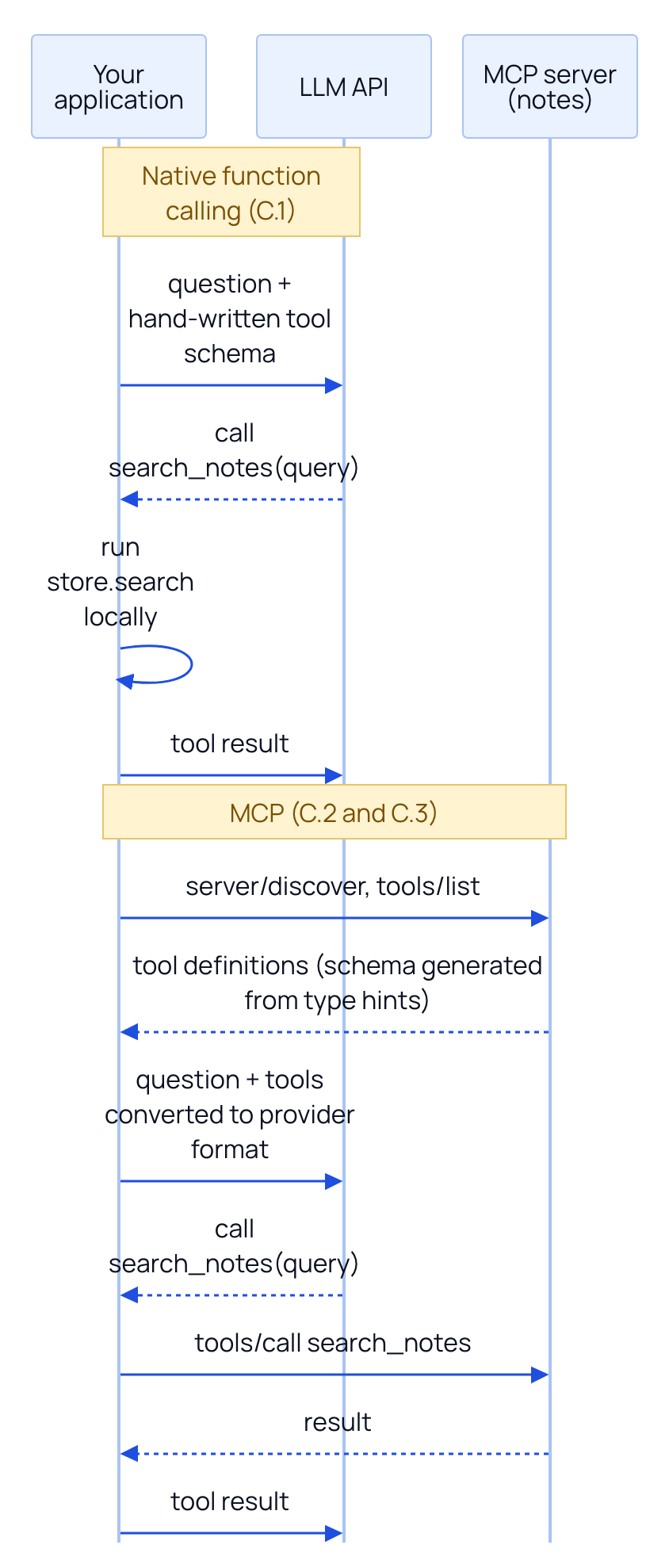
The diagram shows the key difference. With MCP, the model and the provider API are unchanged; the host still uses native function calling. What moved is where the tool definitions come from (discovered from a server) and where the tool runs (in the server, possibly another process or machine, possibly written by someone else).
| Situation | Use this | Why |
|---|---|---|
| Tests and embedding a server you construct yourself | In-memory Client(server_object) | No subprocess, no port; the Module Lab measures about 1 ms per call |
| A local server launched by a desktop host or CLI agent | stdio (StdioServerParameters) | The host owns the process lifetime and passes credentials through env |
| A shared or remote server, several users, or deployment behind a load balancer | Streamable HTTP (a URL) | Network reachable; Modules 2, 7, and 9 add headers, auth, and scaling |
C.4 Diagnosing a broken stdio launch
The most common first failure with stdio is a server that dies before it speaks. Here it is on purpose: the same launch without env={"PYTHONPATH": "."}.
"""Module 1: a deliberately broken stdio launch, to practise reading the failure.

The server needs PYTHONPATH=. to import notes_assistant, and a stdio child does
not inherit your environment, so leaving env= out makes the server die at import.

Run:  PYTHONPATH=. python examples/m01_broken_stdio.py
"""
import sys

import anyio

from mcp import Client, StdioServerParameters

BROKEN = StdioServerParameters(command=sys.executable, args=["examples/m01_first_server.py"])


async def main() -> None:
    try:
        with anyio.fail_after(10):
            async with Client(BROKEN) as client:
                await client.list_tools()
    except Exception as exc:  # show the type and message the client surfaces
        print(f"client saw: {type(exc).__name__}: {exc}")
        while isinstance(exc, BaseExceptionGroup):  # dig down to the real cause
            exc = exc.exceptions[0]
        print(f"root cause: {type(exc).__name__}: {exc}")


if __name__ == "__main__":
    anyio.run(main)
Code explained
- In simple words: we unplug the server's power cable and look at what the client reports versus what actually went wrong.
- What happens:
BROKENlaunches the server withoutPYTHONPATH, so itsimport notes_assistantfails. The client waits for a reply, sees the pipe close, and raises.anyio.fail_after(10)guards against hanging forever. Thewhileloop unwraps the exception groups that structured concurrency (anyiotask groups) wraps errors in, to reach the root cause. - Comes out: real output, with the absolute path rewritten as
/path/to/notes-assistant:textTraceback (most recent call last): File "/path/to/notes-assistant/examples/m01_first_server.py", line 11, in <module> from notes_assistant.store import NoteStore ModuleNotFoundError: No module named 'notes_assistant' client saw: ExceptionGroup: unhandled errors in a TaskGroup (1 sub-exception) root cause: MCPError: Connection closedRead it in this order. The client only knows
MCPError: Connection closed: the other end hung up. The real cause is in the traceback above it, which is the server's stderr. A stdio server's stdout carries protocol messages, so its errors and logs go to stderr, and the SDK forwards the child's stderr to yours. The rule for every stdio problem: read the server's stderr first. Then fix the launch (here, addenv={"PYTHONPATH": "."}, or in a real host config, the equivalentenvblock).